


mcp-scholarly MCP server
A MCP server to search for accurate academic articles. More scholarly vendors will be added soon.
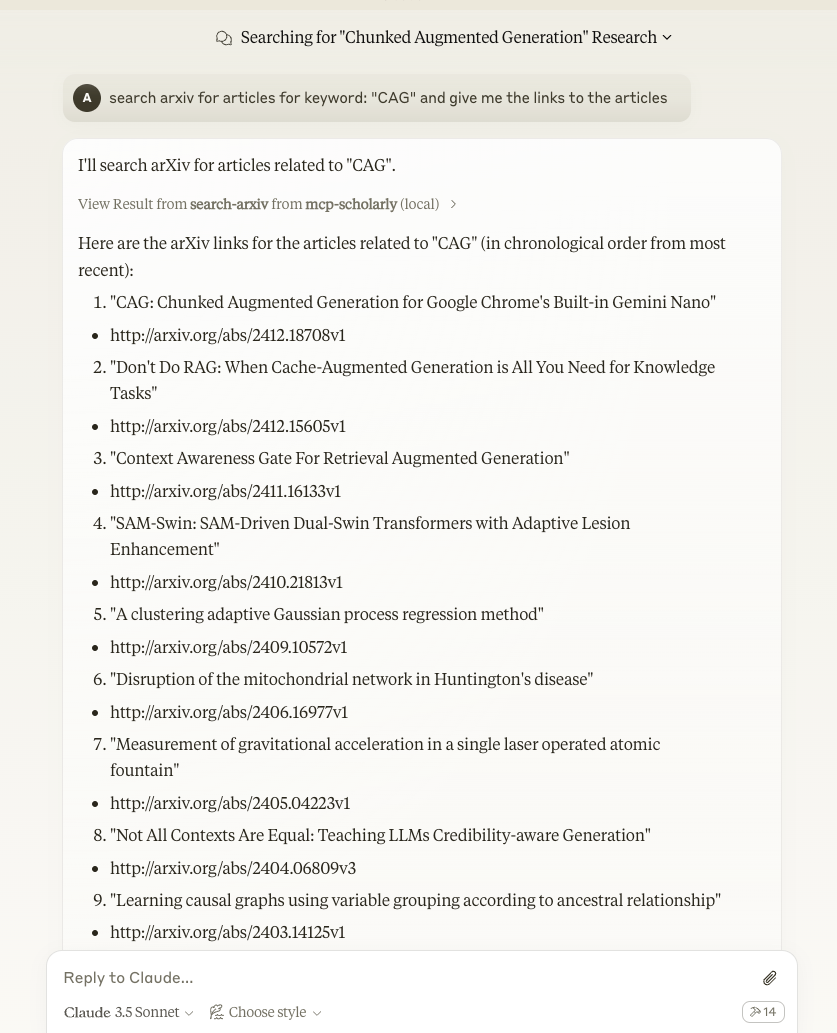
Components
Tools
The server implements one tool:
- search-arxiv: Search arxiv for articles related to the given keyword.
- Takes "keyword" as required string arguments
Quickstart
Install
Claude Desktop
On MacOS: ~/Library/Application\\ Support/Claude/claude_desktop_config.json
On Windows: %APPDATA%/Claude/claude_desktop_config.json
Development/Unpublished Servers Configuration
``` "mcpServers": { "mcp-scholarly": { "command": "uv", "args": [ "--directory", "/Users/adityakarnam/PycharmProjects/mcp-scholarly/mcp-scholarly", "run", "mcp-scholarly" ] } } ```Published Servers Configuration
``` "mcpServers": { "mcp-scholarly": { "command": "uvx", "args": [ "mcp-scholarly" ] } } ```or if you are using Docker
Published Docker Servers Configuration
``` "mcpServers": { "mcp-scholarly": { "command": "docker", "args": [ "run", "--rm", "-i", "mcp/scholarly" ] } } ```Installing via Smithery
To install mcp-scholarly for Claude Desktop automatically via Smithery:
npx -y @smithery/cli install mcp-scholarly --client claude
Development
Building and Publishing
To prepare the package for distribution:
- Sync dependencies and update lockfile:
uv sync
- Build package distributions:
uv build
This will create source and wheel distributions in the dist/ directory.
- Publish to PyPI:
uv publish
Note: You'll need to set PyPI credentials via environment variables or command flags:
- Token:
--tokenorUV_PUBLISH_TOKEN - Or username/password:
--username/UV_PUBLISH_USERNAMEand--password/UV_PUBLISH_PASSWORD
Debugging
Since MCP servers run over stdio, debugging can be challenging. For the best debugging experience, we strongly recommend using the MCP Inspector.
You can launch the MCP Inspector via npm with this command:
npx @modelcontextprotocol/inspector uv --directory /Users/adityakarnam/PycharmProjects/mcp-scholarly/mcp-scholarly run mcp-scholarly
Upon launching, the Inspector will display a URL that you can access in your browser to begin debugging.


Recommend MCP Servers 💡

github-graphql-mcp-server
A Model Context Protocol (MCP) server that provides access to GitHub's GraphQL API. This server exposes a single tool that allows executing arbitrary GraphQL queries and mutations against GitHub's API.

simple-mcp-fileserver
A lightweight MCP server enabling AI agents to interact with local file systems through JSON-RPC interface

@JackKuo666/pubtator-mcp-server
A biomedical literature annotation and relationship mining server based on PubTator3 accessible through MCP interface.

@remote-mcp/client
A type-safe local proxy MCP server that enables remote access and centralized management of model contexts by connecting to a remote MCP implementation.


edgeone-geo-mcp-server
An MCP server that integrates with EdgeOne Pages Functions to retrieve user geolocation information for large language models.

k8s eye
MCP Server for kubernetes management and diagnose your cluster and applications
