

PDF MCP Server




Transform PDF manipulation with AI-powered natural language commands through Claude integration
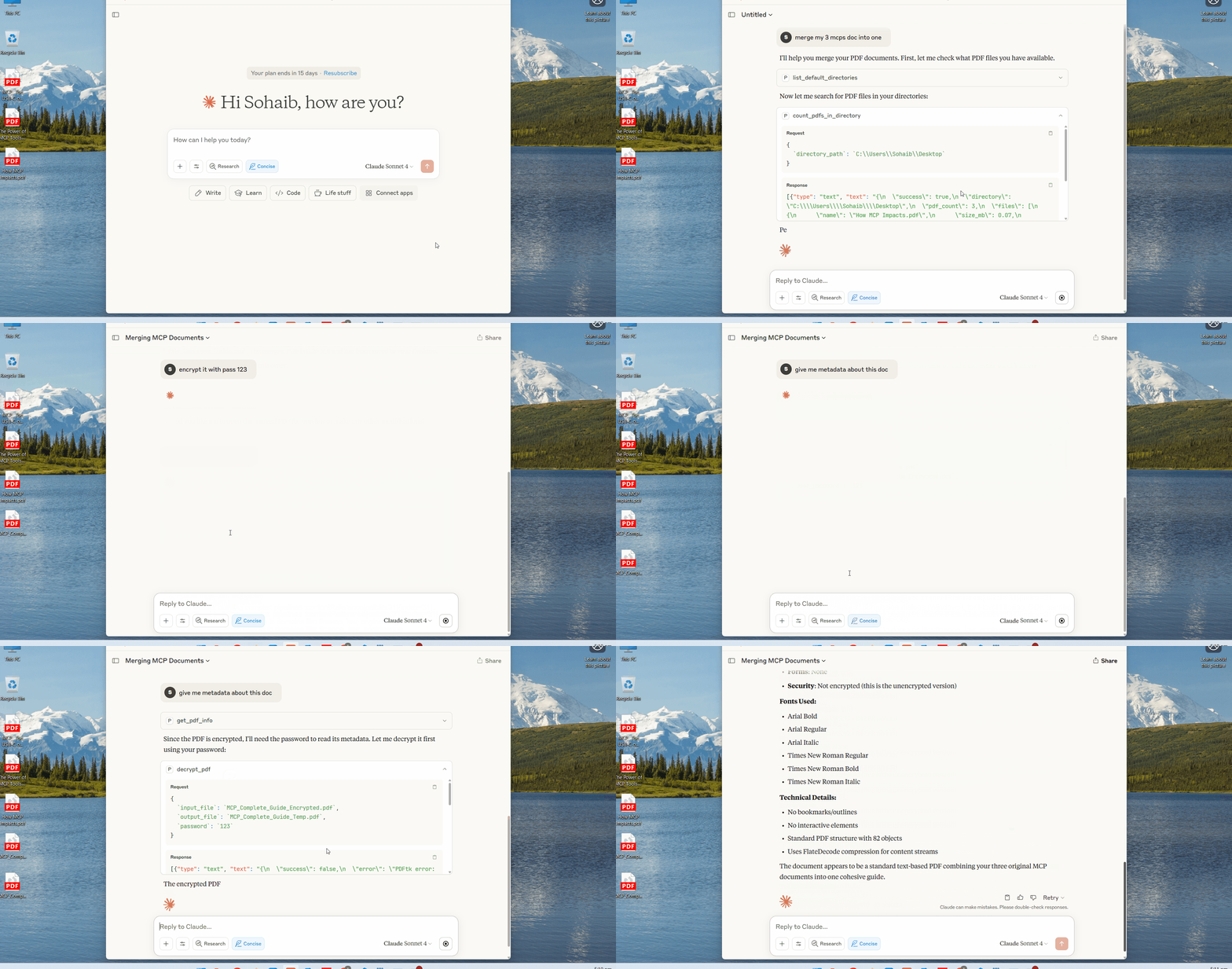
Comprehensive PDF toolkit that integrates seamlessly with Claude AI via MCP (Model Context Protocol). Perform complex PDF operations using simple conversational commands - merge, split, encrypt, optimize, and analyze PDFs effortlessly.
🚀 Quick Start
Clone & Setup
git clone https://github.com/Sohaib-2/pdf-mcp-server.git
cd pdf-mcp-server
Option 1: With Virtual Environment (Recommended)
python -m venv .venv
# Windows
.venv\\Scripts\\activate
# macOS/Linux
source .venv/bin/activate

pip install -r requirements.txt
Option 2: Without Virtual Environment
pip install fastmcp requests pathlib
Install PDF Tools
PDFtk:
# Ubuntu/Debian
sudo apt-get install pdftk
# macOS
brew install pdftk-java
# Windows: Download from https://www.pdflabs.com/tools/pdftk-the-pdf-toolkit/
QPDF:
# Ubuntu/Debian
sudo apt-get install qpdf
# macOS
brew install qpdf
# Windows: Download from https://qpdf.sourceforge.io/
🔧 Claude Desktop Integration
-
Locate Claude config file:
- Windows:
%APPDATA%\\Claude\\claude_desktop_config.json - macOS:
~/Library/Application Support/Claude/claude_desktop_config.json
- Windows:
-
Add PDF MCP Server:
With Virtual Environment:
{
  "mcpServers": {
    "pdf-tools": {
      "command": "C:\\\\path\\\\to\\\\pdf-mcp-server\\\\.venv\\\\Scripts\\\\python.exe",
      "args": ["C:\\\\path\\\\to\\\\pdf-mcp-server\\\\server.py"]
    }
  }
}
Without Virtual Environment:
{
  "mcpServers": {
    "pdf-tools": {
      "command": "python",
      "args": ["C:\\\\path\\\\to\\\\pdf-mcp-server\\\\server.py"]
    }
  }
}
macOS/Linux with venv:
{
  "mcpServers": {
    "pdf-tools": {
      "command": "/path/to/pdf-mcp-server/.venv/bin/python",
      "args": ["/path/to/pdf-mcp-server/server.py"]
    }
  }
}
-
Restart Claude Desktop
-
Start using natural language:
- "Merge these 3 PDFs into one document"
- "Encrypt my report with password protection"
- "Extract pages 1-10 from this manual"
📚 Complete Tool Reference
Core Operations
| Tool | Description | Example |
|---|---|---|
merge_pdfs |
Combine multiple PDFs | merge_pdfs(['doc1.pdf', 'doc2.pdf'], 'combined.pdf') |
split_pdf |
Split into individual pages | split_pdf('document.pdf', './pages/') |
extract_pages |
Extract specific page ranges | extract_pages('book.pdf', '1-5,10,15-20', 'excerpt.pdf') |
rotate_pages |
Rotate pages by degrees | rotate_pages('scan.pdf', '90', 'rotated.pdf', '1-3') |
Security & Encryption
| Tool | Description | Example |
|---|---|---|
encrypt_pdf |
AES-256 encryption | encrypt_pdf('file.pdf', 'secure.pdf', 'password123') |
encrypt_pdf_basic |
Basic password protection | encrypt_pdf_basic('doc.pdf', 'protected.pdf', 'pass', 'admin') |
decrypt_pdf |
Remove password protection | decrypt_pdf('locked.pdf', 'unlocked.pdf', 'password') |
Optimization & Repair
| Tool | Description | Example |
|---|---|---|
optimize_pdf |
Compress for web/email | optimize_pdf('large.pdf', 'small.pdf', 'high') |
repair_pdf |
Fix corrupted PDFs | repair_pdf('broken.pdf', 'fixed.pdf') |
check_pdf_integrity |
Validate PDF structure | check_pdf_integrity('suspicious.pdf') |
Information & Analysis
| Tool | Description | Example |
|---|---|---|
get_pdf_info |
Detailed metadata (JSON) | get_pdf_info('document.pdf') |
update_pdf_metadata |
Modify title/author/etc | update_pdf_metadata('file.pdf', 'updated.pdf', title='New Title') |
inspect_pdf_structure |
Internal structure analysis | inspect_pdf_structure('complex.pdf', detailed=True) |
extract_pdf_attachments |
Extract embedded files | extract_pdf_attachments('portfolio.pdf', './attachments/') |
File Management
| Tool | Description | Example |
|---|---|---|
download_pdf |
Download from URL | download_pdf('https://example.com/file.pdf', 'local.pdf') |
open_pdf_preview |
Open with system viewer | open_pdf_preview('report.pdf', browser=False) |
get_file_info |
File size/path details | get_file_info('document.pdf') |
configure_pdf_workspace |
Set working directory | configure_pdf_workspace('/path/to/workspace') |
count_pdfs_in_directory |
List PDFs in folder | count_pdfs_in_directory('./pdf_folder/') |
System Management
| Tool | Description | Purpose |
|---|---|---|
get_server_status |
Check tool availability | Verify PDFtk/QPDF installation |
list_default_directories |
Show search paths | Debug file resolution issues |
get_pdf_tools_help |
Complete documentation | In-app help reference |
💬 Natural Language Examples
Document Management:
- "Combine all my research papers into one bibliography"
- "Split this 100-page manual into chapters"
- "Extract the executive summary from pages 2-4"
Security Operations:
- "Encrypt this contract with military-grade protection"
- "Remove password from this locked document"
- "Add owner permissions to prevent editing"
File Optimization:
- "Optimize all PDFs in my downloads folder"
- "Fix this corrupted presentation file"
Advanced Analysis:
- "Show me detailed metadata about this academic paper"
- "Analyze the internal structure for security audit"
🗂️ File Path Handling
Flexible path resolution:
- Absolute:
C:\\Documents\\file.pdf - Relative:
../pdfs/document.pdf - Filename only:
report.pdf(searches default directories)
Default search order:
PDF_WORKSPACEenvironment variable~/Documents/PDFs~/Downloads~/Desktop- Current working directory
⚙️ Configuration
Custom workspace:
configure_pdf_workspace('/path/to/your/pdfs')
Check installation:
get_server_status() # Verify PDFtk and QPDF availability
🛠️ Troubleshooting
Common issues:
| Problem | Solution |
|---|---|
PDFtk not found |
Install PDFtk and add to PATH |
QPDF error |
Install QPDF via package manager |
File not found |
Use list_default_directories() to check search paths |
Permission denied |
Run with appropriate file permissions |
Invalid PDF |
Use check_pdf_integrity() to validate file |
Debug commands:
get_server_status()           # Check tool installation
list_default_directories()    # Verify search paths
get_pdf_info('file.pdf')      # Validate PDF structure
🏗️ Architecture
pdf-mcp-server/
├── server.py              # FastMCP server with 16 tools
├── pdftk_tools.py         # PDFtk CLI wrapper
├── qpdf_tools.py          # QPDF CLI wrapper
├── utils.py               # File utilities & path resolution
└── requirements.txt       # Python dependencies
Built with:
🤝 Contributing
- Fork the repository
- Create feature branch:
git checkout -b feature/amazing-feature - Commit changes:
git commit -m 'Add amazing feature' - Push to branch:
git push origin feature/amazing-feature - Open Pull Request
📄 License
This project is licensed under the MIT License
👨💻 Author
Sohaib-2 - GitHub
🌟 Acknowledgments
⭐ Star this repo if it helped you! | 🐛 Report issues | 💡 Request features

Recommend MCP Servers 💡

mcp-ipfs-server
A MCP server that integrates IPFS for decentralized data storage and sharing interactions


fibery-mcp-server
This MCP (Model Context Protocol) server provides integration between Fibery and any LLM provider supporting the MCP protocol (e.g., Claude for Desktop), allowing you to interact with your Fibery workspace using natural language.

@remote-mcp/client
A type-safe local proxy MCP server that enables remote access and centralized management of model contexts by connecting to a remote MCP implementation.

awslabs.bedrock-kb-retrieval-mcp-server
An MCP server for accessing and querying Amazon Bedrock Knowledge Bases, enabling natural language retrieval, data source filtering, and result reranking.

kanboard-mcp-server
A Go-based MCP server enabling AI agents and LLMs to interact with Kanboard for project, task, and user management via natural language commands.


gitlab-mcp
A MCP server enabling AI clients to perform GitLab operations like repo management, issue tracking, and merge requests via the GitLab API.