

Install
$ npx skills add greyhaven-ai/autocontextREADME
# GitHub Repository: greyhaven-ai/autocontext
**URL:** https://github.com/greyhaven-ai/autocontext
**Author:** greyhaven-ai
**Description:** a recursive self-improving harness designed to help your agents (and future iterations of those agents) succeed on any task
**Homepage:**
**Language:** Python
## Stats
- Stars: 1223
- Forks: 101
- Open Issues: 0
- Commits: 1881
- Created: 2026-02-11T22:23:23Z
- Updated: 2026-06-25T10:50:12Z
- Pushed: 2026-06-24T21:01:21Z
## README
<!-- autocontext-readme-hero:start -->
<p align="center">
<picture>
<source media="(prefers-color-scheme: dark)" srcset="autocontext/assets/autocontext-wordmark-dark.svg" />
<source media="(prefers-color-scheme: light)" srcset="autocontext/assets/autocontext-wordmark.svg" />
<img src="autocontext/assets/autocontext-wordmark.svg" alt="autocontext logo" width="720" style="max-width: 100%; height: auto;" />
</picture>
</p>
<p align="center"><strong>a recursive self-improving harness designed to help your agents (and future iterations of those agents) succeed on any task</strong></p>
<p align="center">
<a href="https://github.com/greyhaven-ai/autocontext/blob/main/LICENSE"><img src="https://img.shields.io/github/license/greyhaven-ai/autocontext" alt="License"></a>
<a href="https://github.com/greyhaven-ai/autocontext/stargazers"><img src="https://img.shields.io/github/stars/greyhaven-ai/autocontext" alt="GitHub stars"></a>
<a href="https://github.com/greyhaven-ai/autocontext/commits/main"><img src="https://img.shields.io/github/last-commit/greyhaven-ai/autocontext" alt="Last commit"></a>
<a href="https://pypi.org/project/autocontext/"><img src="https://img.shields.io/pypi/v/autocontext" alt="PyPI version"></a>
<a href="https://www.npmjs.com/package/autoctx"><img src="https://img.shields.io/npm/v/autoctx" alt="npm version"></a>
</p>
<!-- autocontext-readme-hero:end -->
autocontext is a harness. You point it at a goal in plain language. It iterates against real evaluation, keeps what worked, throws out what didn't, and produces a structured trace of the work plus the artifacts, playbooks, datasets, and (optionally) a distilled local model that the next agent inherits. Repeated runs get better, not just different.
**Documentation:** [autocontext.ai/docs](https://autocontext.ai/docs) · [quickstart](https://autocontext.ai/docs/get-started/quickstart) · [CLI reference](https://autocontext.ai/docs/cli/reference) · [changelog](https://autocontext.ai/docs/changelog)
## Try It In 30 Seconds
The fastest path uses our **Pi runtime**, a local coding agent that handles its own auth. No API key plumbing, no provider config: install Pi, install autocontext, point one at the other.
```bash
uv tool install autocontext==0.10.0
AUTOCONTEXT_AGENT_PROVIDER=pi \
AUTOCONTEXT_PI_COMMAND=pi \
autoctx solve \
"improve customer-support replies for billing disputes" \
--iterations 3
```
Pi runs locally as a subprocess and emits live traces back into the harness. For a hosted Pi, set `AUTOCONTEXT_AGENT_PROVIDER=pi-rpc` and `AUTOCONTEXT_PI_RPC_ENDPOINT` instead.
Prefer TypeScript? Same surface, same command:
```bash
bun add -g [email protected]
AUTOCONTEXT_AGENT_PROVIDER=pi bunx autoctx solve \
"improve customer-support replies for billing disputes" \
--iterations 5 --json
```
Already on Anthropic, OpenAI, Gemini, Mistral, Groq, OpenRouter, Azure, Claude CLI, Codex CLI, or MLX? Set `AUTOCONTEXT_AGENT_PROVIDER` and the matching credential env var:
```bash
AUTOCONTEXT_AGENT_PROVIDER=anthropic \
ANTHROPIC_API_KEY=sk-ant-... \
autoctx solve "..." --iterations 3
```
See [`.env.example`](.env.example) for every provider's variables, or use the live provider guide at [autocontext.ai/docs/providers](https://autocontext.ai/docs/providers). Prefer to clone and run a starter? [`examples/README.md`](examples/README.md) has copy-paste recipes for Python CLI, Claude Code MCP, Python SDK, TypeScript library usage, and the experimental TypeScript agent handler surface.
## Or Just Talk To Your Agent
If you already work inside a coding agent, you can wire autocontext in once and give the agent a natural-language entry point. Hermes and other terminal-capable agents should start with the CLI-backed skill; MCP remains available for clients that want a tool-catalog protocol.
**Pi** ships an autocontext skill out of the box. Install the published Pi package and Pi loads natural-language wrappers over live tools such as `autocontext_solve_scenario`, `autocontext_evaluate_output`, `autocontext_run_improvement_loop`, `autocontext_run_status`, and `autocontext_list_scenarios`.
```bash
pi install npm:[email protected]
```
Pi is on a separate package line: `[email protected]` depends on `autoctx@^0.8.0`. A follow-up Pi release can move it to a newer `autoctx` line after the core npm package is live.
Then you just ask:
> "Solve: improve customer-support replies for billing disputes."
>
> "Judge this output against this rubric and improve it until it scores 0.85."
**Claude Code** (and any other MCP client) gets the same surface by adding one entry to `.claude/settings.json`:
```json
{
"mcpServers": {
"autocontext": {
"command": "uv",
"args": ["run", "--directory", "/path/to/autocontext", "autoctx", "mcp-serve"],
"env": { "AUTOCONTEXT_AGENT_PROVIDER": "pi", "AUTOCONTEXT_PI_COMMAND": "pi" }
}
}
}
```
After that, Python MCP exposes prefixed tools such as `autocontext_solve_scenario`, `autocontext_evaluate_output`, `autocontext_run_improvement_loop`, `autocontext_run_status`, `autocontext_list_scenarios`, `autocontext_export_skill`, and `autocontext_search_strategies`. It also exposes runtime-session readers as `autocontext_list_runtime_sessions`, `autocontext_get_runtime_session`, and `autocontext_get_runtime_session_timeline`, with unprefixed aliases for parity with TypeScript MCP; Python runtime-backed `run` and `solve` role calls populate those logs automatically. The TypeScript package exposes the same capabilities with its documented tool names via `bunx autoctx mcp-serve`.
**Hermes Agent** can load a CLI-first skill and inspect Hermes Curator state without MCP:
```bash
cd autocontext
uv run autoctx hermes export-skill --output ~/.hermes/skills/autocontext/SKILL.md --json
# Add progressive-disclosure reference files alongside SKILL.md
uv run autoctx hermes export-skill \
--output ~/.hermes/skills/autocontext/SKILL.md \
--with-references --json
uv run autoctx hermes inspect --json
```
Full integration guide: [autocontext.ai/docs/agents](https://autocontext.ai/docs/agents) and [autocontext/docs/agent-integration.md](autocontext/docs/agent-integration.md).
## What You Get Back
Every run leaves a structured record on disk. Replay it, diff it, export it, feed it back into training.
```
runs/<run_id>/
├── trace.jsonl # every prompt, tool call, and outcome, in order
├── generations/
│ ├── gen_1/
│ │ ├── strategy.json # what the competitor proposed
│ │ ├── analysis.md # what the analyst observed
│ │ └── score.json # how it was evaluated
│ └── gen_2/ ...
├── report.md # human-readable summary of the whole run
└── artifacts/ # files, configs, packages the run produced
knowledge/<scenario>/
├── playbook.md # accumulated lessons that carried forward
├── hints.md # competitor hints that survived the curator
└── tools/ # any helper tools the architect generated
```
A `playbook.md` is plain markdown the next run reads as context:
```markdown
<!-- PLAYBOOK_START -->
## Billing dispute replies
- Always restate the disputed charge in the first sentence; refunds requested without
explicit confirmation cause loops.
- "Pending" charges are not yet billable. Don't promise a refund until status flips
to `posted`. Verified gen_4, regressed in gen_7 when omitted.
- Empathy + specific next step beats empathy alone. Escalation rate dropped from
0.31 to 0.12 once the second sentence named the next-step owner.
<!-- PLAYBOOK_END -->
```
A `trace.jsonl` line is one event:
```json
{
"ts": "2026-04-28T17:42:11Z",
"gen": 4,
"role": "competitor",
"event": "strategy_proposed",
"score": 0.78,
"tokens_in": 1840,
"tokens_out": 612,
"strategy_id": "s_4f2a"
}
```
Inspect, replay, or compare any of it:
```bash
uv run autoctx list
uv run autoctx status <run_id>
uv run autoctx replay <run_id> --generation 2
```
## How It Works
Inside each run, five roles cooperate:
- **competitor** proposes a strategy or artifact for the task
- **analyst** explains what happened and why
- **coach** turns that analysis into playbook updates and future hints
- **architect** proposes tools or harness changes when the loop is stuck
- **curator** gates what knowledge is allowed to persist across runs
Strategies are evaluated through scenario execution, staged validation, and gating. Weak changes are rolled back. Successful changes accumulate as reusable knowledge that future runs (and future agents) inherit automatically.
The full vocabulary (Scenario, Task, Mission, Campaign, Run, Verifier, Knowledge, Artifact, Budget, Policy) lives in the [concept docs](https://autocontext.ai/docs/concepts) and [docs/concept-model.md](docs/concept-model.md).
## Capture What's Happening In Production
autocontext can sit alongside your live application and record what your agents do, then turn that into training data. Wrap your existing Anthropic or OpenAI client once:
```python
from anthropic import Anthropic
from autocontext.production_traces import instrument_client
client = instrument_client(Anthropic(), app="billing-bot", env="prod")
# use `client` exactly like before; calls are captured to JSONL with content blocks,
# cache-aware usage, and Anthropic-native outcome taxonomy.
```
```ts
import Anthropic from "@anthropic-ai/sdk";
import { instrumentClient } from "autoctx/production-traces";
const client = instrumentClient(new Anthropic(), { app: "billing-bot", env: "prod" });
```
Then build scoped datasets from the captured traces:
```bash
uv run autoctx build-dataset \
--app billing-bot --provider anthropic \
--env prod --outcome success \
--output training/billing.jsonl
```
And distill them into a smaller local model with MLX (Apple Silicon) or CUDA (Linux GPUs):
```bash
uv run autoctx train --scenario support_triage --data training/billing.jsonl --time-budget 300
```
<!-- autocontext-whats-new:start -->
## What's New in 0.10.0
- **Scaled training plans** add default-off CUDA/TRL profiles for 7B QLoRA RLVR and sharded 32B/72B distillation across Python and TypeScript.
- **Training scale metadata** records device count, sharding, memory budgets, quantization, parameter count, and deployment VRAM for registry gating.
- **TypeScript CLI parity** makes `--scale-profile` preserve profile backend/base/mode and documents every scale-related train flag.
<!-- autocontext-whats-new:end -->
## Choose Your Package
| If you want to... | Start here |
| --------------------------------------------------------------- | ------------------------------------------------------------------------------ |
| Run the full multi-generation control plane (Python) | [autocontext/README.md](autocontext/README.md) |
| Run from Node, or operate missions, simulations, investigations | [ts/README.md](ts/README.md) |
| Install the Pi extension package | [pi/README.md](pi/README.md) |
| Wire an external coding agent into autocontext over MCP | [autocontext/docs/agent-integration.md](autocontext/docs/agent-integration.md) |
| Grab copy-paste integration snippets | [examples/README.md](examples/README.md) |
```bash
# Python: library or CLI tool
uv pip install autocontext==0.10.0
uv tool install autocontext==0.10.0
# TypeScript
bun add -g [email protected]
# Pi extension
pi install npm:[email protected]
```
> The PyPI package is `autocontext`. The CLI entrypoint is `autoctx`. The npm packages are `autoctx` and `pi-autocontext` (note: an unrelated package on npm uses the name `autocontext`; that is not this project). `[email protected]` still depends on `autoctx@^0.8.0`; a follow-up Pi release can move it to a newer `autoctx` line after the core npm package is live.
## Surfaces
| Surface | Command | When to use it |
| ------------------ | ------------------------------------------------------ | -------------------------------------------------------------------------------------- |
| `solve` | `autoctx solve "..." --iterations 3` | Hand the harness a goal in plain language; it generates the scenario and runs the loop |
| `run` | `autoctx run <scenario> --iterations 3` | Improve behavior inside a saved scenario across generations |
| `simulate` | `autoctx simulate -d "..."` | Model a system, sweep parameters, replay, compare |
| `investigate` | `autoctx investigate -d "..."` | Evidence-driven diagnosis, either synthetic harness or live iterative LLM session |
| `analyze` | `autoctx analyze --id <id> --type <kind>` | Inspect or compare runs, simulations, investigations, or missions after the fact |
| `mission` | `autoctx mission create --name "..." --goal "..."` | Verifier-driven goal advanced step by step until done |
| `campaign` | `bunx autoctx campaign ...` (TypeScript) | Coordinate multiple missions with budgets, dependencies, progress aggregation |
| `worker` | `autoctx worker --poll-interval 5` | Process queued tasks on a persistent host beside `autoctx serve` |
| `export` | `autoctx export <run-id>` | Share solved knowledge as JSON, skills, or Pi-local package directories |
| `train` | `autoctx train --scenario <name> --data <jsonl>` | Distill stable exported data into a cheaper local runtime |
| `context-selection` | `bunx autoctx context-selection --run-id <run-id> --json` (TypeScript CLI) | Inspect persisted prompt context budget, cache, diagnostics, and selection telemetry |
| `runtime-sessions` | `bunx autoctx runtime-sessions timeline --run-id <run-id>` (TypeScript CLI) | Inspect persisted provider prompts, messages, child-task events, and operator-facing timelines from runtime-backed runs; also exposed through Python and TypeScript MCP/cockpit HTTP, the TypeScript TUI `/timeline` plus persisted filterable and resettable `/activity` live feed, and `/ws/events` updates |
| `agent` | `bunx autoctx agent run support --id ticket-123 --payload '{"message":"..."}' --json` (TypeScript CLI) | Invoke experimental `.autoctx/agents` handlers locally, run `autoctx agent dev`, or generate the self-hosted Node target with `autoctx agent build --target node` |
| `hermes` | `uv run autoctx hermes inspect --json` (Python) | Inspect Hermes v0.12 skill usage and Curator reports, or export the Hermes skill |
| `replay` | `autoctx replay <run_id> --generation N` | Inspect what happened before deciding what knowledge should persist |
## Scenario Families
All 11 families execute in both Python and TypeScript. TypeScript uses V8 isolate codegen; Python uses subprocess executors.
| Family | Evaluation | What it tests |
| ------------------ | ----------------------- | ----------------------------------------------------------------------- |
| `game` | Tournament with Elo | Turn-based strategy (grid_ctf, othello) |
| `agent_task` | LLM judge | Prompt-centric tasks with optional improvement loops |
| `simulation` | Trace evaluation | Action-trace scenarios with mock environments and fault injection |
| `artifact_editing` | Artifact validation | File, config, and schema modification with diff tracking |
| `investigation` | Evidence chains | Diagnosis accuracy with red herring detection |
| `workflow` | Workflow evaluation | Transactional flows with compensation, retry, and side-effect tracking |
| `negotiation` | Negotiation evaluation | Hidden preferences, BATNA constraints, and opponent modeling |
| `schema_evolution` | Schema adaptation | Mid-run state changes where agents must detect stale context |
| `tool_fragility` | Drift adaptation | APIs that drift, requiring agents to adapt to changed tool behavior |
| `operator_loop` | Judgment evaluation | Escalation and clarification judgment in operator-in-the-loop workflows |
| `coordination` | Coordination evaluation | Multi-agent partial context, handoff, merge, and duplication detection |
## Providers, Runtimes, Executors
**LLM providers**: Anthropic (with `instrument_client` capture), OpenAI-compatible (vLLM, Ollama, Hermes), Gemini, Mistral, Groq, OpenRouter, Azure OpenAI, MLX (Apple Silicon), CUDA (Linux GPUs), Pi (CLI and RPC).
**Agent runtimes**: Claude CLI, Codex CLI, Hermes CLI, Direct API, Pi variants, plus branch-aware session and persistent Pi RPC for local agent loops.
**Executors**: Local subprocess, SSH remote, Monty (`pydantic-monty` sandbox), PrimeIntellect remote sandbox. Gondolin is reserved as an optional fail-closed microVM backend until its adapter is wired.
**Harness profiles and hooks**: The Python control plane supports a Pi-shaped lean profile that caps prompt context during generation and exports a minimal tool-affordance allowlist for agent surfaces that enforce tool gating. Semantic prompt compactions are recorded as Pi-shaped JSONL entries under each run; the TypeScript package now includes a mirrored deterministic prompt compactor plus `ArtifactStore` ledger read/write/latest APIs for standalone npm runs. Python and TypeScript runs can load `AUTOCONTEXT_EXTENSIONS`; Python extensions are Python modules, while TypeScript extensions are JavaScript/ESM modules that register hooks around context assembly, semantic compaction, provider calls, judge calls, artifact writes, and run lifecycle events.
A deterministic offline provider exists for the test suite. Configuration matrix: [`.env.example`](.env.example) and [docs/concept-model.md](docs/concept-model.md).
## FAQ
**Is autocontext a benchmark?**
No. It's a harness for improving real agent behavior on real work. Benchmarks (the 11 scenario families) are one of many surfaces; you can also point it at production tasks, missions, or simulations.
**How is this different from DSPy, Inspect, TextGrad, or a prompt optimizer?**
Those tools optimize prompts. autocontext takes a goal in plain language, generates the scenario, runs a multi-role loop with verifier-driven gating, and produces transferable artifacts (playbooks, datasets, distilled models) that the next run inherits. Prompt optimization is a special case.
**Do I need API keys?**
No. The Pi runtime runs locally and handles its own auth. Anthropic, OpenAI, Gemini, Mistral, Groq, OpenRouter, Azure, MLX, and Claude/Codex CLI are all opt-in via env vars.
**Where does the knowledge live?**
On your filesystem. Runs go to `runs/`, accumulated knowledge to `knowledge/`. Indexed metadata is in SQLite. Everything is inspectable, diffable, and portable.
**Can my coding agent drive autocontext directly?**
Yes. Wire `autoctx mcp-serve` (or `bunx autoctx mcp-serve`) into Claude Code, Cursor, or Pi as an MCP server, and the agent gets natural-language access to `solve`, `judge`, `improve`, `status`, `export_skill`, and the rest. See [Or Just Talk To Your Agent](#or-just-talk-to-your-agent).
## Where To Look Next
- Live documentation: [autocontext.ai/docs](https://autocontext.ai/docs)
- Canonical vocabulary and object model: [docs/concept-model.md](docs/concept-model.md)
- Python package guide: [autocontext/README.md](autocontext/README.md)
- TypeScript package guide: [ts/README.md](ts/README.md)
- Copy-paste examples: [examples/README.md](examples/README.md)
- External agent integration: [autocontext/docs/agent-integration.md](autocontext/docs/agent-integration.md)
- Recent changes: [CHANGELOG.md](CHANGELOG.md) and [autocontext.ai/docs/changelog](https://autocontext.ai/docs/changelog)
- Contributor setup: [CONTRIBUTING.md](CONTRIBUTING.md)
- Repo layout for coding agents: [AGENTS.md](AGENTS.md)
- Local + cross-platform model training (MLX and TRL backends): [autocontext/docs/mlx-training.md](autocontext/docs/mlx-training.md)
- Validated training result (on-policy distillation vs RLVR on GSM8K): [autocontext/docs/case-study-on-policy-distillation.md](autocontext/docs/case-study-on-policy-distillation.md)
- Recursive loop closed end to end on local MLX (train -> auto-serve -> improve): [autocontext/docs/case-study-recursive-loop.md](autocontext/docs/case-study-recursive-loop.md)
- Sandbox and executor notes: [autocontext/docs/sandbox.md](autocontext/docs/sandbox.md)
- Persistent host worker: [autocontext/docs/persistent-host.md](autocontext/docs/persistent-host.md)
- Background execution trust boundaries: [docs/background-execution-trust-boundaries.md](docs/background-execution-trust-boundaries.md)
- License: [LICENSE](LICENSE)
## Acknowledgments
Thanks to [George](https://github.com/GeorgeH87) for generously donating the `autocontext` name on PyPI.
## Project Signals
[](https://www.npmjs.com/package/autoctx)
[](https://pypi.org/project/autocontext/)
[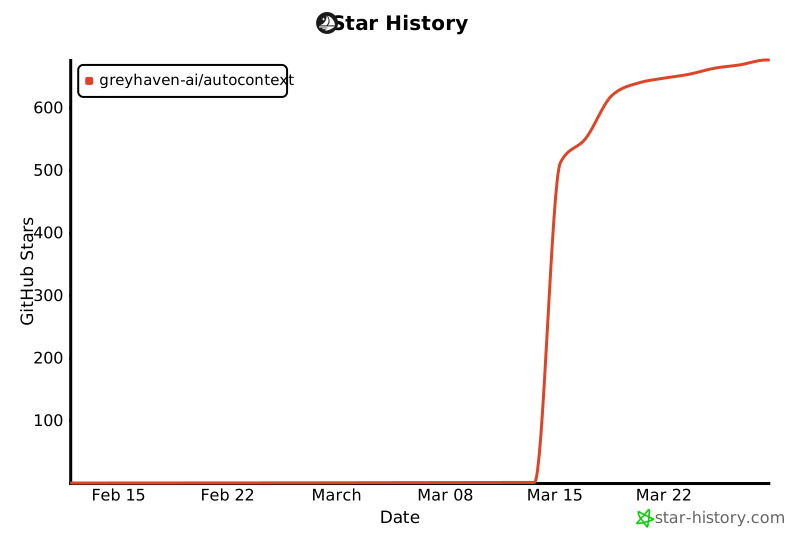](https://www.star-history.com/#greyhaven-ai/autocontext&Date)
Information
Repository
Language
Python
Created
2026/6/25
Updated
2026/6/26