

Install
$ npx skills add scarletkc/vexorREADME
# GitHub Repository: scarletkc/vexor
**URL:** https://github.com/scarletkc/vexor
**Author:** scarletkc
**Description:** A semantic search engine for files and code.
**Homepage:** https://pypi.org/project/vexor/
**Language:** Python
## Stats
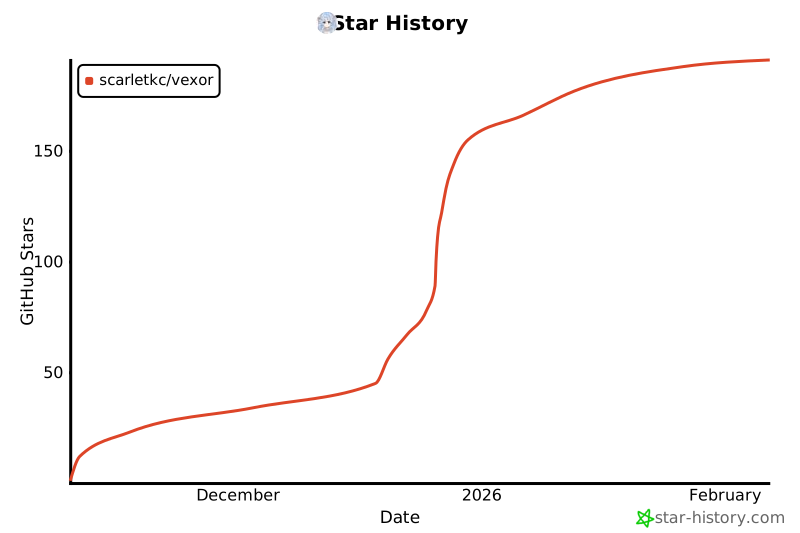
- Stars: 218
- Forks: 13
- Open Issues: 2
- Commits: 285
- Created: 2025-11-09T08:18:11Z
- Updated: 2026-06-10T08:51:21Z
- Pushed: 2026-03-06T17:20:07Z
## README
<div align="center">
<img src="https://raw.githubusercontent.com/scarletkc/vexor/refs/heads/main/assets/vexor.svg" alt="Vexor" width="35%" height="auto">
# Vexor
[](https://www.python.org/downloads/)
[](https://pypi.org/project/vexor/)
[](https://github.com/scarletkc/vexor/actions/workflows/publish.yml)
[](https://codecov.io/github/scarletkc/vexor)
[](https://github.com/scarletkc/vexor/blob/main/LICENSE)
[](https://deepwiki.com/scarletkc/vexor)
</div>
---
**Vexor** is a semantic search engine that builds reusable indexes over files and code.
It supports configurable embedding and reranking providers, and exposes the same core through a Python API, a CLI tool, and an optional desktop frontend.
<video src="https://github.com/user-attachments/assets/4d53eefd-ab35-4232-98a7-f8dc005983a9" controls="controls" style="max-width: 600px;">
Vexor Demo Video
</video>
## Featured In
Vexor has been recognized and featured by the community:
- **[Ruan Yifeng's Weekly (Issue #379)](https://github.com/ruanyf/weekly/blob/master/docs/issue-379.md#ai-%E7%9B%B8%E5%85%B3)** - A leading tech newsletter in the Chinese developer community.
- **[Awesome Claude Skills](https://github.com/VoltAgent/awesome-claude-skills?tab=readme-ov-file#development-and-testing)** - Curated list of best-in-class skills for AI agents.
## Why Vexor?
When you remember what a file *does* but forget its name or location, Vexor finds it instantly—no grep patterns or directory traversal needed.
Designed for both humans and AI coding assistants, enabling semantic file discovery in autonomous agent workflows.
## Install
Download standalone binary from [releases](https://github.com/scarletkc/vexor/releases) (no Python required), or:
```bash
pip install vexor # also works with pipx, uv
```
## Quick Start
### 0. Guided Setup (Recommended)
```bash
vexor init
```
The wizard also runs automatically on first use when no config exists.
### 1. Search
```bash
vexor "api client config" # defaults to search current directory
# or explicit path:
vexor search "api client config" --path ~/projects/demo --top 5
# in-memory search only:
vexor search "api client config" --no-cache
```
Vexor auto-indexes on first search. Example output:
```
Vexor semantic file search results
──────────────────────────────────
# Similarity File path Lines Preview
1 0.923 ./src/config_loader.py - config loader entrypoint
2 0.871 ./src/utils/config_parse.py - parse config helpers
3 0.809 ./tests/test_config_loader.py - tests for config loader
```
### 2. Explicit Index (Optional)
```bash
vexor index # indexes current directory
# or explicit path:
vexor index --path ~/projects/demo --mode code
```
Useful for CI warmup or when `auto_index` is disabled.
## Desktop App (Experimental)
> The desktop app is experimental and not actively maintained.
> It may be unstable. For production use, prefer the CLI.
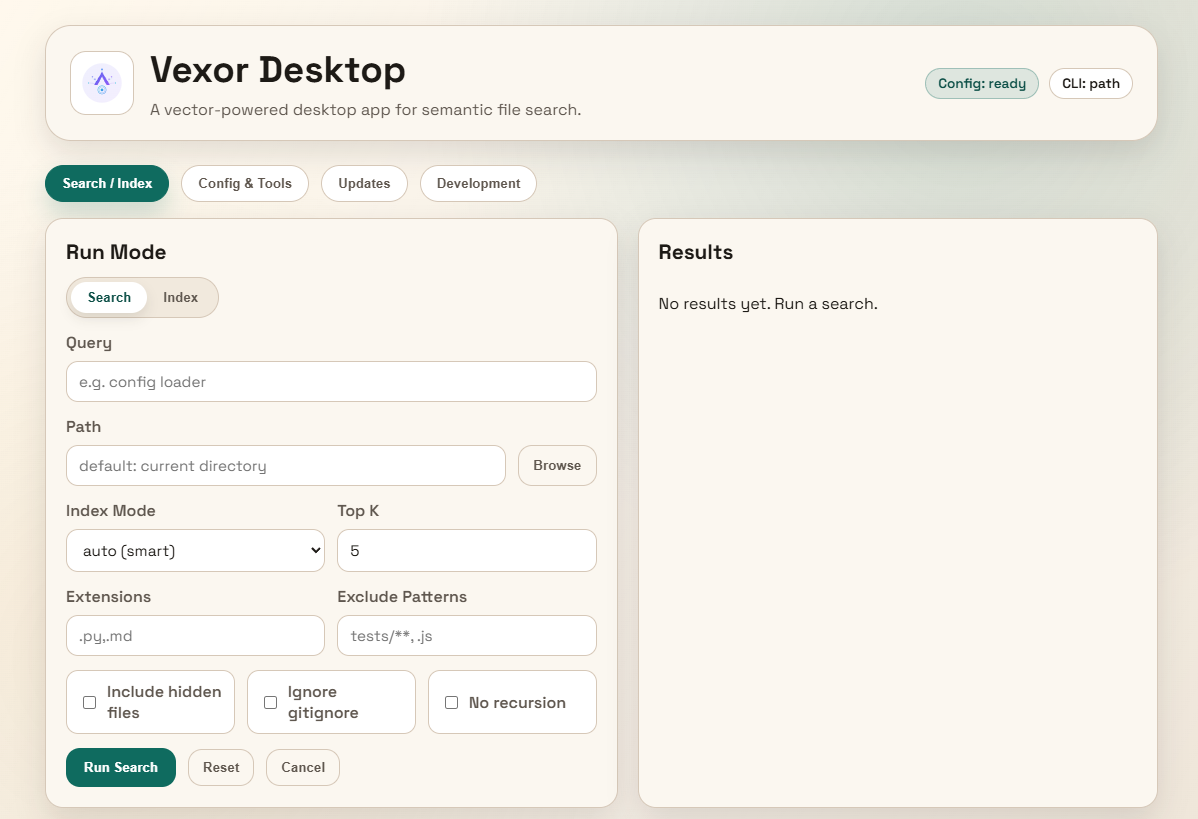
Download the desktop app from [releases](https://github.com/scarletkc/vexor/releases).
## Python API
Vexor can also be imported and used directly from Python:
```python
from vexor import index, search
index(path=".", mode="head")
response = search("config loader", path=".", mode="name")
for hit in response.results:
print(hit.path, hit.score)
```
By default it reads `~/.vexor/config.json`. For runtime config overrides, cache
controls, and per-call options, see [`docs/api/python.md`](https://github.com/scarletkc/vexor/tree/main/docs/api/python.md).
## AI Agent Skill
This repo includes a skill for AI agents to use Vexor effectively:
```bash
vexor install --skills claude # Claude Code
vexor install --skills codex # Codex
```
Skill source: [`plugins/vexor/skills/vexor-cli`](https://github.com/scarletkc/vexor/raw/refs/heads/main/plugins/vexor/skills/vexor-cli/SKILL.md)
## Configuration
```bash
vexor config --set-provider openai # default; also supports gemini/voyageai/custom/local
vexor config --set-model text-embedding-3-small
vexor config --set-provider voyageai # uses voyage defaults when model/base_url are unset
vexor config --set-batch-size 0 # 0 = single request
vexor config --set-embed-concurrency 4 # parallel embedding requests
vexor config --set-extract-concurrency 4 # parallel file extraction workers
vexor config --set-extract-backend auto # auto|thread|process (default: auto)
vexor config --set-embedding-dimensions 1024 # optional, model/provider dependent
vexor config --clear-embedding-dimensions # reset to model default dimension
vexor config --set-auto-index true # auto-index before search (default)
vexor config --rerank bm25 # optional BM25 rerank for top-k results
vexor config --rerank flashrank # FlashRank rerank (requires optional extra)
vexor config --rerank remote # remote rerank via HTTP endpoint
vexor config --set-flashrank-model ms-marco-MultiBERT-L-12 # multilingual model
vexor config --set-flashrank-model # reset FlashRank model to default
vexor config --clear-flashrank # remove cached FlashRank models
vexor config --set-remote-rerank-url https://proxy.example.com/v1/rerank
vexor config --set-remote-rerank-model bge-reranker-v2-m3
vexor config --set-remote-rerank-api-key $VEXOR_REMOTE_RERANK_API_KEY # or env var
vexor config --clear-remote-rerank # clear remote rerank config
vexor config --set-base-url https://proxy.example.com # optional proxy
vexor config --clear-base-url # reset to official endpoint
vexor config --show # view current settings
```
Rerank defaults to `off`. **It is highly recommended to configure the Reranker in advance to improve search accuracy.**
FlashRank requires `pip install "vexor[flashrank]"` and caches models under `~/.vexor/flashrank`.
Config stored in `~/.vexor/config.json`.
### Configure API Key
```bash
vexor config --set-api-key "YOUR_KEY"
```
Or via environment: `VEXOR_API_KEY`, `OPENAI_API_KEY`, `GOOGLE_GENAI_API_KEY`, or `VOYAGE_API_KEY`.
### Rerank
Rerank reorders the semantic results with a secondary ranker. Candidate sizing uses
`clamp(int(--top * 2), 20, 150)`.
Recommended defaults:
- Keep `off` unless you want extra precision.
- Use `bm25` for lightweight lexical boosts; it is fast and lightweight.
- BM25 uses a multilingual tokenizer (Bert pre-tokenizer), so it can handle CJK better.
- Use `flashrank` for stronger reranking (requires `pip install "vexor[flashrank]"` and
downloads a model to `~/.vexor/flashrank`).
- Use `remote` to call a hosted reranker that accepts `{model, query, documents}` and
returns ranked indexes.
- For Chinese or multi-language content, set `--set-flashrank-model ms-marco-MultiBERT-L-12`.
- If unset, FlashRank defaults to `ms-marco-TinyBERT-L-2-v2`.
### Providers: Remote vs Local
Vexor supports both remote API providers (`openai`, `gemini`, `voyageai`, `custom`) and a local provider (`local`):
- Remote providers use `api_key` and optional `base_url`.
- `voyageai` defaults to `https://api.voyageai.com/v1` when `base_url` is not set.
- `custom` is OpenAI-compatible and requires both `model` and `base_url`.
- Local provider ignores `api_key/base_url` and only uses `model` plus `local_cuda` (CPU/GPU switch).
### Embedding Dimensions
Embedding dimensions are optional. If unset, the provider/model default is used.
Custom dimensions are validated for:
- OpenAI `text-embedding-3-*`
- Voyage `voyage-3*` and `voyage-code-3*`
```bash
vexor config --set-embedding-dimensions 1024
vexor config --clear-embedding-dimensions
```
If you change dimensions after an index is built, rebuild the index:
```bash
vexor index --path .
```
### Local Model (Offline)
Install the lightweight local backend:
```bash
pip install "vexor[local]"
```
GPU backend (requires CUDA drivers):
```bash
pip install "vexor[local-cuda]"
```
Download a local embedding model and auto-configure Vexor:
```bash
vexor local --setup --model intfloat/multilingual-e5-small
```
Then use `vexor search` / `vexor index` as usual.
Local models are stored in `~/.vexor/models` (clear with `vexor local --clean-up`).
GPU (optional): install `onnxruntime-gpu` (or `vexor[local-cuda]`) and use `vexor local --setup --cuda` (or `vexor local --cuda`).
Switch back with `vexor local --cpu`.
## Index Modes
Control embedding granularity with `--mode`:
| Mode | Description |
|------|-------------|
| `auto` | **Default.** Smart routing: Python/JS/TS → `code`, Markdown → `outline`, small files → `full`, large files → `head` |
| `name` | Embed filename only (fastest, zero content reads) |
| `head` | Extract first snippet for lightweight semantic context |
| `brief` | Extract high-frequency keywords from PRDs/requirements docs |
| `full` | Chunk entire content; long documents searchable end-to-end |
| `code` | AST-aware chunking by module/class/function boundaries for Python and JavaScript/TypeScript; other files fall back to `full` |
| `outline` | Chunk Markdown by heading hierarchy with breadcrumbs; non-`.md` falls back to `full` |
## Cache Behavior
Index cache keys derive from: `--path`, `--mode`, `--include-hidden`, `--no-recursive`, `--no-respect-gitignore`, `--ext`, `--exclude-pattern`.
Keep flags consistent to reuse cache; changing flags creates a separate index.
```bash
vexor config --show-index-all # list all cached indexes
vexor config --clear-index-all # clear all cached indexes
vexor index --path . --clear # clear index for specific path
```
Re-running `vexor index` only re-embeds changed files; >50% changes trigger full rebuild.
## Command Reference
| Command | Description |
|---------|-------------|
| `vexor init` | Run the interactive setup wizard |
| `vexor QUERY` | Shortcut for `vexor search QUERY` |
| `vexor search QUERY --path PATH` | Semantic search (auto-indexes if needed) |
| `vexor index --path PATH` | Build/refresh index manually |
| `vexor config --show` | Display current configuration |
| `vexor config --clear-flashrank` | Remove cached FlashRank models under `~/.vexor/flashrank` |
| `vexor local --setup [--model MODEL]` | Download a local model and set provider to `local` |
| `vexor local --clean-up` | Remove local model cache under `~/.vexor/models` |
| `vexor local --cuda` | Enable CUDA for local embeddings (requires `onnxruntime-gpu`) |
| `vexor local --cpu` | Disable CUDA and use CPU for local embeddings |
| `vexor install --skills claude` | Install Agent Skill for Claude Code |
| `vexor install --skills codex` | Install Agent Skill for Codex |
| `vexor doctor` | Run diagnostic checks (command, config, cache, API key, API connectivity) |
| `vexor update [--upgrade] [--pre]` | Check for new version (optionally upgrade; `--pre` includes pre-releases) |
| `vexor feedback` | Open GitHub issue form (or use `gh`) |
| `vexor alias` | Print a shell alias for `vx` and optionally apply it |
### Common Flags
| Flag | Description |
|------|-------------|
| `--path PATH` | Target directory (default: current working directory) |
| `--mode MODE` | Index mode (`auto`/`name`/`head`/`brief`/`full`/`code`/`outline`) |
| `--top K` / `-k` | Number of results (default: 5) |
| `--ext .py,.md` / `-e` | Filter by extension (repeatable) |
| `--exclude-pattern PATTERN` | Exclude paths by gitignore-style pattern (repeatable; `.js` treated as `**/*.js`) |
| `--include-hidden` / `-i` | Include hidden files |
| `--no-recursive` / `-n` | Don't recurse into subdirectories |
| `--no-respect-gitignore` | Include gitignored files |
| `--format porcelain` | Script-friendly TSV output |
| `--format porcelain-z` | NUL-delimited output |
| `--no-cache` | In-memory only; do not read/write index cache |
Porcelain output fields: `rank`, `similarity`, `path`, `chunk_index`, `start_line`, `end_line`, `preview` (line fields are `-` when unavailable).
## Documentation
See [docs](https://github.com/scarletkc/vexor/tree/main/docs) for more details.
## Contributing
Contributions, issues, and PRs welcome! Star if you find it helpful.
## Star History
[](https://www.star-history.com/#scarletkc/vexor&type=date&legend=top-left)
## License
[MIT](http://github.com/scarletkc/vexor/blob/main/LICENSE)
Information
Repository
Language
Python
Created
2025/11/9
Updated
2026/8/29