

@chargebee/mcp
The Chargebee MCP Server offers a robust set of tools to improve developer efficiency. It integrates with AI-powered code editors like Cursor, Windsurf, and Cline, as well as general-purpose tools such as Claude Desktop. It is compatible with any MCP Client. With this MCP Server, you can: Get immediate answers about the Chargebee products and API services; Receive context-aware code snippets tailored to your integration needs; Access Chargebee's knowledge base including Documentation, FAQs, Release notes, and much more.
Markdown Content: agentkit/modelcontextprotocol at main · chargebee/agentkit · GitHub
===============
Skip to content Navigation Menu
Toggle navigation
Appearance settings
- Product
*   [GitHub Copilot Write better code with AI](https://github.com/features/copilot)
*   [GitHub Spark New Build and deploy intelligent apps](https://github.com/features/spark)
*   [GitHub Models New Manage and compare prompts](https://github.com/features/models)
*   [GitHub Advanced Security Find and fix vulnerabilities](https://github.com/security/advanced-security)
*   [Actions Automate any workflow](https://github.com/features/actions)

*   [Codespaces Instant dev environments](https://github.com/features/codespaces)
*   [Issues Plan and track work](https://github.com/features/issues)
*   [Code Review Manage code changes](https://github.com/features/code-review)
*   [Discussions Collaborate outside of code](https://github.com/features/discussions)
*   [Code Search Find more, search less](https://github.com/features/code-search)
Explore * Why GitHub * All features * Documentation * GitHub Skills * Blog
- Solutions
By company size * Enterprises * Small and medium teams * Startups * Nonprofits
By use case * DevSecOps * DevOps * CI/CD * View all use cases
By industry * Healthcare * Financial services * Manufacturing * Government * View all industries
- Resources
Topics * AI * DevOps * Security * Software Development * View all
Explore * Learning Pathways * Events & Webinars * Ebooks & Whitepapers * Customer Stories * Partners * Executive Insights
- Open Source
*   [GitHub Sponsors Fund open source developers](https://github.com/sponsors)

*   [The ReadME Project GitHub community articles](https://github.com/readme)
Repositories * Topics * Trending * Collections
- Enterprise
* [Enterprise platform AI-powered developer platform](https://github.com/enterprise)
Available add-ons * GitHub Advanced Security Enterprise-grade security features * Copilot for business Enterprise-grade AI features * Premium Support Enterprise-grade 24/7 support
Search or jump to...
Search code, repositories, users, issues, pull requests...
Search
Clear
Provide feedback
We read every piece of feedback, and take your input very seriously.
- [x] Include my email address so I can be contacted
Cancel Submit feedback
Saved searches
Use saved searches to filter your results more quickly
Name
Query
To see all available qualifiers, see our documentation.
Cancel Create saved search
Appearance settings
Resetting focus
You signed in with another tab or window. Reload to refresh your session.You signed out in another tab or window. Reload to refresh your session.You switched accounts on another tab or window. Reload to refresh your session.Dismiss alert
{{ message }}
-
NotificationsYou must be signed in to change notification settings
-
Security### Uh oh! There was an error while loading.Please reload this page.
Additional navigation options
Collapse file tree
Files
main
Search this repository
-
.github -
media -
modelcontextprotocol-
src -
.env.development -
.env.production -
.gitignore -
CLAUDE.md -
CONTRIBUTING.md -
README.md -
package.json -
pnpm-lock.yaml -
tsconfig.json -
tsup.config.ts
-
-
.gitignore -
.prettierignore -
.prettierrc -
CONTRIBUTING.md -
LICENSE -
README.md -
SECURITY.md -
package.json -
pnpm-lock.yaml
Breadcrumbs
/ modelcontextprotocol
/
Copy path
Directory actions
More options
Directory actions
More options
Latest commit

Jul 16, 2025
f71e35c·Jul 16, 2025
History
Open commit details
Breadcrumbs
/ modelcontextprotocol
/
Top
Folders and files
| Name | Name | Last commit message | Last commit date |
|---|---|---|---|
| ### parent directory .. | |||
| src | src | Changing the description to control the behavior on when code planner… | Jul 16, 2025 |
| .env.development | .env.development | feat: add code planner tool | Mar 24, 2025 |
| .env.production | .env.production | Update API endpoints (#25) | Jul 12, 2025 |
| .gitignore | .gitignore | feat: add MCP Server (#1) | Mar 13, 2025 |
| CLAUDE.md | CLAUDE.md | Fix typos and update error message for Chargebee MCP (#23) | Jul 7, 2025 |
| CONTRIBUTING.md | CONTRIBUTING.md | feat: add MCP Server (#1) | Mar 13, 2025 |
| README.md | README.md | Merge pull request#15from chargebee/chore/publish-mcp | Apr 7, 2025 |
| package.json | package.json | chore: bumps package version | Jul 16, 2025 |
| pnpm-lock.yaml | pnpm-lock.yaml | feat: add code planner tool | Mar 24, 2025 |
| tsconfig.json | tsconfig.json | fix: user agent and stdio logging issue (#4) | Mar 14, 2025 |
| tsup.config.ts | tsup.config.ts | feat: add code planner tool | Mar 24, 2025 |
| View all files |
README.md
Outline
Chargebee Model Context Protocol (MCP) Server
Model Context Protocol (MCP) is a standardized protocol designed to manage context between large language models (LLMs) and external systems.
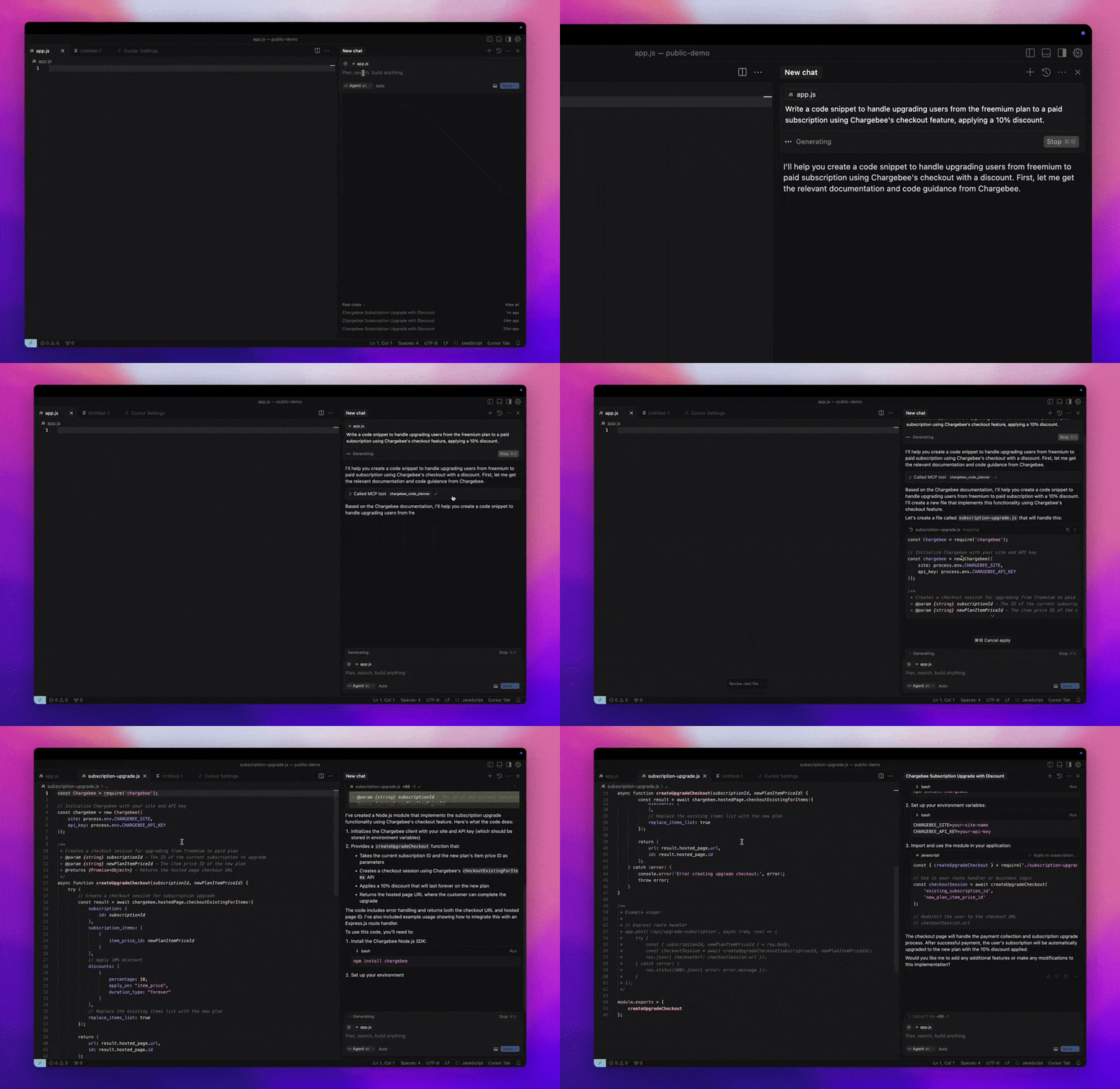
The Chargebee MCP Server offers a robust set of tools to improve developer efficiency. It integrates with AI-powered code editors like Cursor, Windsurf, and Cline, as well as general-purpose tools such as Claude Desktop. It is compatible with any MCP Client.
With this MCP Server, you can:
-
Get immediate answers about the Chargebee products and API services.
-
Receive context-aware code snippets tailored to your integration needs.
-
Access Chargebee's knowledge base, including:
- Documentation
- FAQs
- Release notes
- And much more
Prerequisites
- Node.js LTS - The Chargebee MCP server requires the Node.js LTS version to function correctly.
Setup
To run the Chargebee MCP server using Node.js npx, execute the following command:
undefinedshell npx -y @chargebee/mcp@latest undefined
Available Tools
| Tool | Description |
|---|---|
chargebee_documentation_search |
Search Chargebee's documentation to retrieve detailed information and usage guides. |
chargebee_code_planner |
Generate structured code outlines and sample code for integrating Chargebee's APIs and features. |
Installation
Cursor
To add this server to Cursor IDE:
- Navigate to
Cursor Settings>MCP. - Click
+ Add new Global MCP Server. - Add the following configuration to your global
.cursor/mcp.jsonfile:
undefinedjson { "mcpServers": { "chargebee": { "command": "npx", "args": [ "-y", "@chargebee/mcp" ] } } } undefined
Refer to the Cursor documentation for additional details. Note: You can also add this to your project-specific Cursor configuration (supported in Cursor 0.46+).
Windsurf
To set up MCP with Cascade:
- Open Windsurf and navigate to
Settings>Advanced Settingsor use the Command Palette >Open Windsurf Settings Page. - Scroll to the Cascade section to add a new server, view existing servers, or access the raw JSON config file at
mcp_config.json. - Click “Add custom server +” to include the Chargebee MCP server directly in
mcp_config.json:
undefinedjson { "mcpServers": { "chargebee": { "command": "npx", "args": [ "-y", "@chargebee/mcp" ] } } } undefined
Refer to the Windsurf documentation for more information.
VS Code
Install the Chargebee MCP server in VS Code using one of these buttons:
Alternatively, you can install the Chargebee MCP server using the VS Code CLI:
undefinedshell
For VS Code
code --add-mcp '{"name":"chargebee","command":"npx","args":["-y","@chargebee/mcp"]}' undefined
undefinedshell
For VS Code Insiders
code-insiders --add-mcp '{"name":"chargebee","command":"npx","args":["-y","@chargebee/mcp"]}' undefined
After installation, the Chargebee MCP server will be available for use with your GitHub Copilot agent in VS Code.
Claude
Add the following configuration to your claude_desktop_config.json file. Refer to the Claude Desktop documentation for more details:
undefinedjson { "mcpServers": { "chargebee": { "command": "npx", "args": [ "-y", "@chargebee/mcp" ] } } } undefined
Cline
Manually add the following JSON to your cline_mcp_settings.json file via the Cline MCP Server settings:
undefinedjson { "mcpServers": { "chargebee": { "command": "npx", "args": [ "-y", "@chargebee/mcp" ] } } } undefined
Roo Code
Access the MCP settings by selecting Edit MCP Settings in Roo Code settings or using the Roo Code: Open MCP Config command in the VS Code command palette:
undefinedjson { "mcpServers": { "chargebee": { "command": "npx", "args": [ "-y", "@chargebee/mcp" ] } } } undefined
Contribution
To contribute to this project, refer to the contribution guide.
License
Footer
Footer navigation
You can’t perform that action at this time.


Recommend MCP Servers 💡
sui-trader
An MCP server designed for AI agents to perform optimal token swaps on the Sui blockchain.


dexpaprika-mcp
Provides real-time and historical crypto token, DEX trading, and liquidity data across multiple blockchains via natural language queries for AI assistants.

paypal/agent-toolkit
The PayPal MCP server allows you to integrate with PayPal APIs through function calling. This protocol supports various tools to interact with different PayPal services.

stripe-mcp-server
Stripe remote MCP server

token-revoke-mcp
An MCP server for checking and revoking ERC-20 token allowances across multiple blockchains.

RevenueCat MCP Server
Enables AI assistants to manage RevenueCat subscription infrastructure via natural language through MCP