

Yandex Maps MCP Server
MCP Server for the Yandex Maps API.
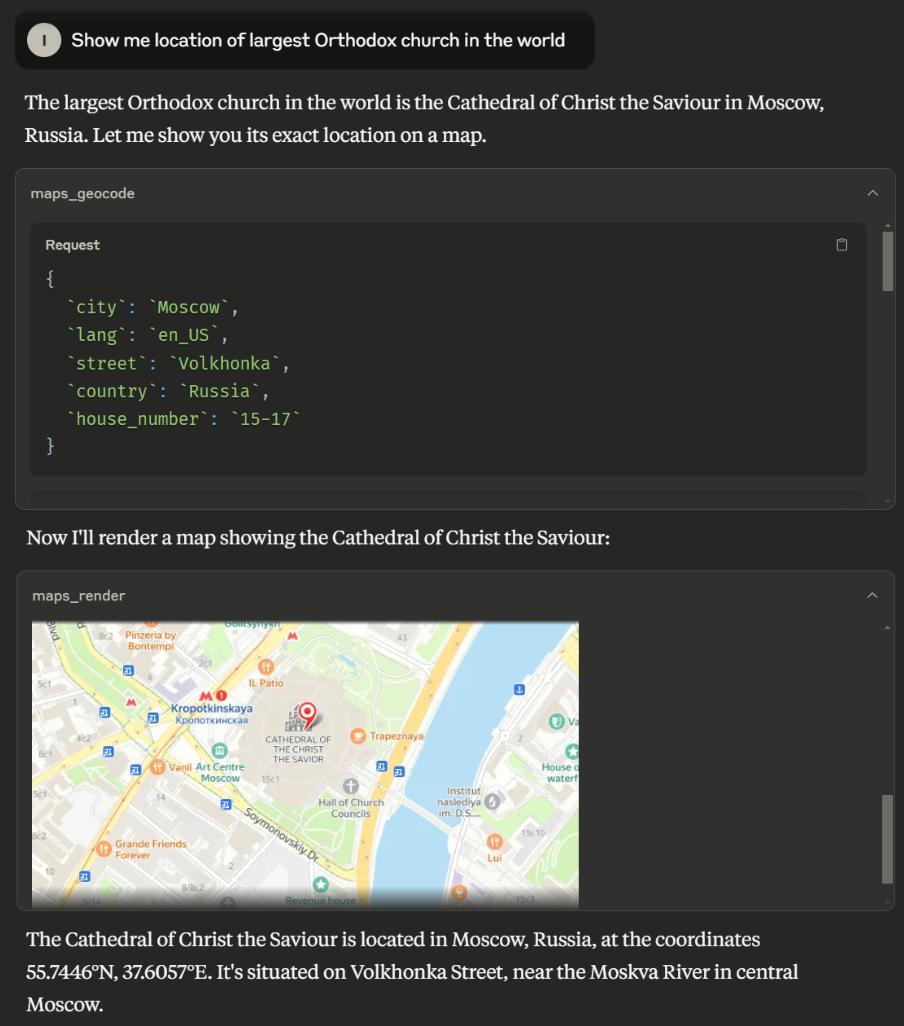
"Show me the map of Berlin"
"Show me location of ..."
Tools
-
maps_geocode- Convert address to coordinates
- Inputs:
country(string) - The country namelang(string) - Language code (e.g., 'ru_RU', 'en_US')state(string, optional) - The state, region or province namecity(string, optional) - The city or locality namedistrict(string, optional) - The district or neighborhood within the citystreet(string, optional) - The street namehouse_number(string, optional) - The house or building number
- Returns: location, formatted_address, address_components
-
maps_reverse_geocode- Convert coordinates to address
- Inputs:
latitude(number)longitude(number)lang(string) - Language code (e.g., 'ru_RU', 'en_US')
- Returns: location, formatted_address, address_components
-
maps_render- Render a map as a png image
- Inputs:
latitude(number) - Latitude coordinate of map centerlongitude(number) - Longitude coordinate of map centerlatitude_span(number) - Height of map image in degreeslongitude_span(number) - Width of map image in degreeslang(string) - Language code (e.g., 'ru_RU', 'en_US')placemarks(array, optional) - Array of placemarks to display on the map with style "pm2rdm"- Each placemark should have
latitudeandlongitudeproperties
- Each placemark should have
- Returns: PNG image of the map
Setup
API Keys
You'll need two Yandex Maps API keys:
- "JavaScript and Geocoder API" key for geocoding functions
- Static API key for map rendering
To generate API keys:
- Open https://developer.tech.yandex.ru/ and authorize
- Click "Connect APIs". Choose "JavaScript and Geocoder API" and fill the form
- Navigate to API's dashboard page and copy API key there
- Repeat from step 2 for Static API.
Local Run
- Clone the repository
- Install dependencies:
npm install - Set your API keys:
export YANDEX_MAPS_API_KEY="your-geocoder-api-key" export YANDEX_MAPS_STATIC_API_KEY="your-static-api-key" - Build server
npm run build - Run the server:
node dist/index.js
Usage with Claude Desktop (stdio)
Add the following to your claude_desktop_config.json:
{
  "mcpServers": {
    "yandex-maps": {
      "command": "node",
      "args": [
        "path/to/index.js"
      ],
      "env": {
        "YANDEX_MAPS_API_KEY": "<YOUR_GEOCODER_API_KEY>",
        "YANDEX_MAPS_STATIC_API_KEY": "<YOUR_STATIC_API_KEY>"
      }
    }
  }
}
Usage as HTTP Server
The server supports Streamable HTTP transport for remote access and web-based clients like n8n.
Starting the HTTP Server
# Set required environment variables
export YANDEX_MAPS_API_KEY="your-geocoder-api-key"
export YANDEX_MAPS_STATIC_API_KEY="your-static-api-key"
export MCP_TRANSPORT="http"
export MCP_PORT="3000"  # Optional, defaults to 3000
export MCP_AUTH_TOKEN="your-secret-token"  # Optional but recommended

# Run the server
node dist/index.js
Configuration
The HTTP server is stateless and uses the following environment variables:
MCP_TRANSPORT: Set to"http"to enable HTTP mode (default:"stdio")MCP_PORT: Port number for HTTP server (default:3000)MCP_AUTH_TOKEN: Optional Bearer token for authentication. If not set, the server runs without authentication (not recommended for production)YANDEX_MAPS_API_KEY: Your Yandex Geocoder API key (required)YANDEX_MAPS_STATIC_API_KEY: Your Yandex Static Maps API key (required)
Authentication
When MCP_AUTH_TOKEN is set, clients must include it in the Authorization header:
Authorization: Bearer your-secret-token
Usage with n8n
To use with n8n, configure the MCP Client node with:
- Server Transport:
HTTP Streamable - URL:
http://your-server:3000(adjust host and port as needed) - Authentication: Add Bearer token if configured
Known Limitations
Yandex Maps Places API has no free tier, which means that LLMs cannot retrieve organization addresses and coordinates through the Yandex Maps MCP. It can only geocode places whose addresses or coordinates are already known to the model or retrieved from other sources such as explicit user input, Web Search, or third-party MCPs.
License
This project is licensed under the MIT License - see the LICENSE file for details.
Recommend MCP Servers 💡

polarsteps-mcp
An unofficial Polarsteps MCP Server enabling models to interact with the Polarsteps API


iMCP
A macOS MCP server providing access to Messages, Contacts, Calendar, Reminders, and more


sanyambassi/thales-cdsp-crdp-mcp-server
A Model Context Protocol (MCP) server enabling AI applications to securely protect and reveal sensitive data via Thales CipherTrust CRDP service, supporting stdio and streamable-http transports


google-analytics-mcp
Connects Google Analytics 4 data to MCP clients, allowing natural language queries for website traffic, user behavior, and analytics data with access to 200+ GA4 dimensions and metrics.

jira-requester
An MCP server designed to interact with the Jira API (v2 client) to fetch ticket information and handle Jira Issues.


microsoft.docs.mcp
The Microsoft Learn MCP Server is a cloud-hosted service that enables AI agents like GitHub Copilot to access trusted and up-to-date information directly from Microsoft's official documentation, offering high-quality content retrieval, semantic understanding, and real-time updates.