

mcp-k8s




A Kubernetes MCP (Model Control Protocol) server that enables interaction with Kubernetes clusters through MCP tools.
Features
- Query supported Kubernetes resource types (built-in resources and CRDs)
- Kubernetes resource operations with fine-grained control
- Read operations: get resource details, list resources by type with filtering options
- Write operations: create, update, and delete resources (each can be independently enabled/disabled)
- Support for all Kubernetes resource types, including custom resources
- Connects to Kubernetes cluster using kubeconfig
- Helm support with fine-grained control
- Helm releases management (list, get, install, upgrade, uninstall)
- Helm repositories management (list, add, remove)
- Each operation can be independently enabled/disabled
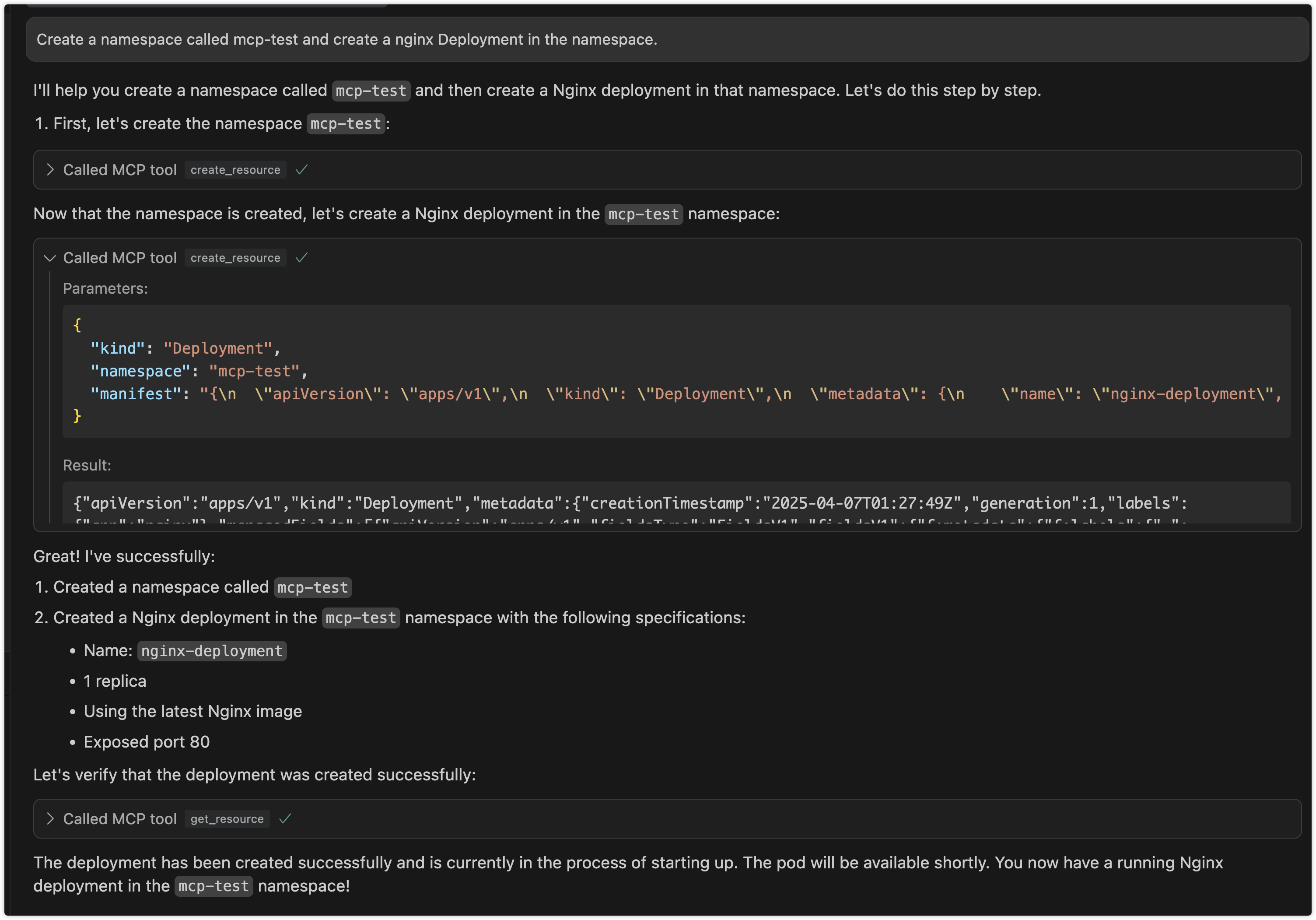
Preview
Interaction through cursor
Use Cases
1. Kubernetes Resource Management via LLM
- Interactive Resource Management: Manage Kubernetes resources through natural language interaction with LLM, eliminating the need to memorize complex kubectl commands
- Batch Operations: Describe complex batch operation requirements in natural language, letting LLM translate them into specific resource operations
- Resource Status Queries: Query cluster resource status using natural language and receive easy-to-understand responses
2. Automated Operations Scenarios
- Intelligent Operations Assistant: Serve as an intelligent assistant for operators in daily cluster management tasks
- Problem Diagnosis: Assist in cluster problem diagnosis through natural language problem descriptions
- Configuration Review: Leverage LLM's understanding capabilities to help review and optimize Kubernetes resource configurations
3. Development and Testing Support
- Quick Prototype Validation: Developers can quickly create and validate resource configurations through natural language
- Environment Management: Simplify test environment resource management, quickly create, modify, and clean up test resources
- Configuration Generation: Automatically generate resource configurations that follow best practices based on requirement descriptions
4. Education and Training Scenarios
- Interactive Learning: Newcomers can learn Kubernetes concepts and operations through natural language interaction
- Best Practice Guidance: LLM provides best practice suggestions during resource operations
- Error Explanation: Provide easy-to-understand error explanations and correction suggestions when operations fail
Architecture
1. Project Overview
An stdio-based MCP server that connects to Kubernetes clusters and provides the following capabilities:
- Query Kubernetes resource types (including built-in resources and CRDs)
- CRUD operations on Kubernetes resources (with configurable write operations)
- Helm operations for release and repository management
2. Technical Stack
- Go
- mcp-go SDK
- Kubernetes client-go library
- Helm v3 client library
- Stdio for communication
3. Core Components
- MCP Server: Uses mcp-go's
mcp-k8spackage to create an stdio-based MCP server - K8s Client: Uses client-go to connect to Kubernetes clusters
- Helm Client: Uses Helm v3 library for Helm operations
- Tool Implementations: Implements various MCP tools for different Kubernetes operations
4. Available Tools
Resource Type Query Tools
get_api_resources: Get all supported API resource types in the cluster
Resource Operation Tools
get_resource: Get detailed information about a specific resourcelist_resources: List all instances of a resource typecreate_resource: Create new resources (can be disabled)update_resource: Update existing resources (can be disabled)delete_resource: Delete resources (can be disabled)
Helm Operation Tools
list_helm_releases: List all Helm releases in the clusterget_helm_release: Get detailed information about a specific Helm releaseinstall_helm_chart: Install a Helm chart (can be disabled)upgrade_helm_chart: Upgrade a Helm release (can be disabled)uninstall_helm_chart: Uninstall a Helm release (can be disabled)list_helm_repositories: List configured Helm repositoriesadd_helm_repository: Add a new Helm repository (can be disabled)remove_helm_repository: Remove a Helm repository (can be disabled)
Usage
mcp-k8s supports three communication modes:
1. Stdio Mode (Default)
In stdio mode, mcp-k8s communicates with the client through standard input/output streams. This is the default mode and is suitable for most use cases.
# Run in stdio mode (default)
{
    "mcpServers":
    {
        "mcp-k8s":
        {
            "command": "/path/to/mcp-k8s",
            "args":
            [
                "--kubeconfig",
                "/path/to/kubeconfig",
                "--enable-create",
                "--enable-delete",
                "--enable-update",
                "--enable-list",
                "--enable-helm-install",
                "--enable-helm-upgrade"
            ]
        }
    }
}
2. SSE Mode
In SSE (Server-Sent Events) mode, mcp-k8s exposes an HTTP endpoint to mcp client. You can deploy the service on a remote server (but you need to pay attention to security)
# Run in SSE mode
./bin/mcp-k8s --kubeconfig=/path/to/kubeconfig --transport=sse --port=8080 --host=localhost --enable-create --enable-delete --enable-list --enable-update --enable-helm-install
# This command will open all operations
mcp config
{
  "mcpServers": {
    "mcp-k8s": {
      "url": "http://localhost:8080/sse",
      "args": []
    }
  }
}
SSE mode configuration:
--transport: Set to "sse" to enable SSE mode--port: HTTP server port (default: 8080)--host: HTTP server host (default: "localhost")
3. Streamable HTTP Mode
In Streamable HTTP mode, mcp-k8s exposes an HTTP endpoint that supports both direct HTTP responses and SSE streams. This mode provides better flexibility and supports streaming output.
# Run in Streamable HTTP mode
./bin/mcp-k8s --kubeconfig=/path/to/kubeconfig --transport=streamable-http --port=8080 --host=localhost --endpoint-path=/mcp --enable-create --enable-delete --enable-list --enable-update --enable-helm-install
mcp config
{
  "mcpServers": {
    "mcp-k8s": {
      "url": "http://localhost:8080/mcp",
      "args": []
    }
  }
}
Streamable HTTP mode configuration:
--transport: Set to "streamable-http" to enable Streamable HTTP mode--port: HTTP server port (default: 8080)--host: HTTP server host (default: "localhost")--endpoint-path: Endpoint path for the MCP server (default: "/mcp")
4. Docker environment
SSE Mode
- Complete Example Assuming your image name is mcp-k8s and you need to map ports and set environment parameters, you can run:
docker run --rm -p 8080:8080 -i -v ~/.kube/config:/root/.kube/config ghcr.io/silenceper/mcp-k8s:latest --transport=sse
Streamable HTTP Mode
docker run --rm -p 8080:8080 -i -v ~/.kube/config:/root/.kube/config ghcr.io/silenceper/mcp-k8s:latest --transport=streamable-http --endpoint-path=/mcp
stdio Mode
{
  "mcpServers": {
    "mcp-k8s": {
      "command": "docker",
      "args": [
        "run",
        "-i",
        "-v",
        "~/.kube/config:/root/.kube/config",
        "--rm",
        "ghcr.io/silenceper/mcp-k8s:latest"
      ]
    }
  }
}
Getting Started
Direct Usage
You can directly download the binary for your platform from the releases page and use it immediately.
Go Install
go install github.com/silenceper/mcp-k8s/cmd/mcp-k8s@latest
Build
Using Makefile (Recommended)
The Makefile automatically injects version information from the VERSION file:
git clone https://github.com/silenceper/mcp-k8s.git
cd mcp-k8s
make build
This will build with version information injected via ldflags.
Direct Build
git clone https://github.com/silenceper/mcp-k8s.git
cd mcp-k8s
go build -o bin/mcp-k8s cmd/mcp-k8s/main.go
Note: Direct build will show version as "dev" unless you specify ldflags manually.
Command Line Arguments
You can use mcp-k8s --help to see all available options, or mcp-k8s --version to check the version.
Kubernetes Resource Operations
--kubeconfig: Path to Kubernetes configuration file (uses default config if not specified)--enable-create: Enable resource creation operations (default: false)--enable-update: Enable resource update operations (default: false)--enable-delete: Enable resource deletion operations (default: false)--enable-list: Enable resource list operations (default: true)
Helm Operations
--enable-helm-release-list: Enable Helm release list operations (default: true)--enable-helm-release-get: Enable Helm release get operations (default: true)--enable-helm-install: Enable Helm chart installation (default: false)--enable-helm-upgrade: Enable Helm chart upgrade (default: false)--enable-helm-uninstall: Enable Helm chart uninstallation (default: false)--enable-helm-repo-list: Enable Helm repository list operations (default: true)--enable-helm-repo-add: Enable Helm repository add operations (default: false)--enable-helm-repo-remove: Enable Helm repository remove operations (default: false)
Transport Configuration
--transport: Transport type (stdio, sse, or streamable-http) (default: "stdio")--host: Host for HTTP transport (SSE or Streamable HTTP) (default: "localhost")--port: TCP port for HTTP transport (SSE or Streamable HTTP) (default: 8080)--endpoint-path: Endpoint path for Streamable HTTP transport (default: "/mcp")
Version Information
--version: Display version information including version, commit hash, and build date--helpor-h: Display help information
Testing Streamable HTTP
To test if Streamable HTTP mode is working correctly, you can use the provided test script:
# Start the server in one terminal
./bin/mcp-k8s --transport=streamable-http --port=8080 --enable-list

# In another terminal, run the test script
./test_streamable_http.sh
For detailed testing instructions, see TEST_STREAMABLE_HTTP.md.
Integration with MCP Clients
mcp-k8s is an stdio-based MCP server that can be integrated with any MCP-compatible LLM client. Refer to your MCP client's documentation for integration instructions.
Security Considerations
- Write operations are strictly controlled through independent configuration switches
- Uses RBAC to ensure K8s client has only necessary permissions
- Validates all user inputs to prevent injection attacks
- Helm operations follow the same security principles with read operations enabled by default and write operations disabled by default
Follow WeChat Official Account


Recommend MCP Servers 💡

secureframe-mcp-server
This Model Context Protocol server provides read-only access to Secureframe's compliance automation platform for AI assistants like Claude and Cursor. It allows querying security controls, monitoring compliance tests, and accessing audit data across various frameworks such as SOC 2, ISO 27001, CMMC, and FedRAMP.


FastlyMCP
An MCP server that integrates Fastly's API to allow AI assistants to manage CDN services, caching, security, and monitor performance.


buryhuang/mcp-server-aws-resources
A Python-based MCP server enabling Claude to query and manage AWS resources via boto3, with sandboxing and containerization for secure execution.

esxi-mcp-server
A VMware ESXi/vCenter management server based on MCP, providing REST API interfaces for virtual machine management.

alibaba-cloud-ops-mcp-server
AlibabaCloud CloudOps MCP Server

@pubnub/mcp
The PubNub Model Context Protocol (MCP) Server exposes PubNub SDK documentation and API resources to LLM-powered tools, enhancing AI agents' ability to understand and interact with PubNub's real-time communication platform.
