AutoMobile
⚠️ PROJECT ARCHIVED
AutoMobile is no longer maintained or supported by Zillow. Zillow does not provide warranties or support for this project.
This repository has been archived and is read-only. For continued development and support, please see the community-maintained fork by Jason Pearson:

AutoMobile is a set of tools for mobile automation. You can use it for UI testing or as a development workflow assistant.
The first platform supported is Android with plans to extend to iOS.
How it works
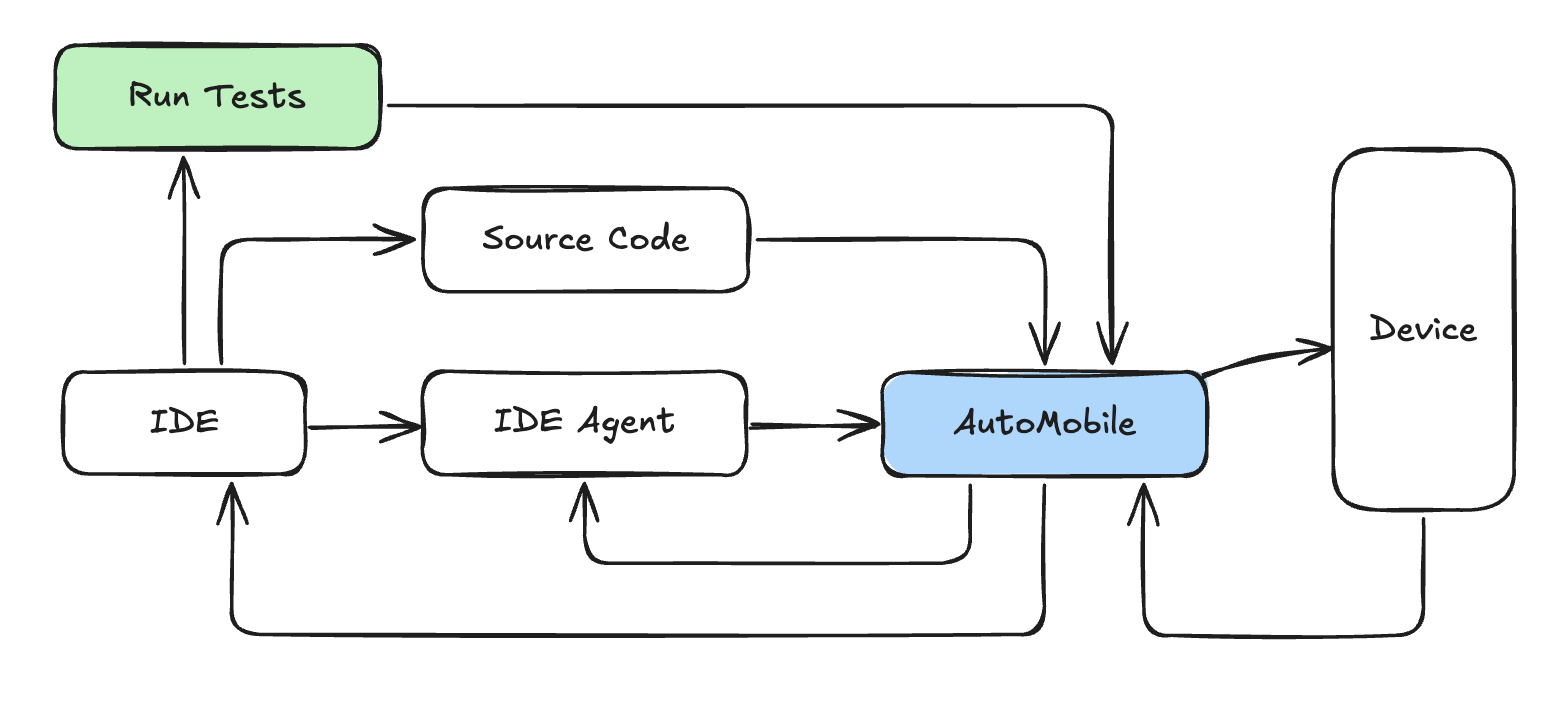
- 🔧 Powerful MCP Server: AutoMobile provides comprehensive actions through MCP tool calls with a fast observations to drive the interaction loop.
- 🗺️ Source Mapping: Combining project path config with deep view hierarchy analysis we know exactly what code is being rendered.
- ✍️ Automated Test Authoring: When used in test authoring mode AutoMobile will write tests for you. It is the only way it writes tests.
- 🧪 Test Execution - Run tests locally or on CI without extra infrastructure.
- 📱 Device Management: Multi-device support with emulator control and app lifecycle management.
All together you get a system that looks like this:
Documentation
- 💻 Installation & Getting Started - AutoMobile is published on npm and we have instructions for agents we've tested with.
- 📝 Change Log - coming soon
Contributing
- Code of Conduct
- Responsible disclosure & use
- Contributing - coming soon
Acknowledgement
By continuing to use AutoMobile, you acknowledge and agree to the warnings and responsible use requirements.


Recommend MCP Servers 💡

lifx-api-mcp-server
A local Model Context Protocol (MCP) server providing natural language access to LIFX devices via LLMs to control lights, set states, activate scenes, and trigger effects through the LIFX HTTP API.


mcp-remote-macos-use
Enables AI to fully control remote macOS systems via MCP protocol


homeassistant-mcp
The server uses the MCP protocol to share access to a local Home Assistant instance with an LLM application. A powerful bridge between your Home Assistant instance and Language Learning Models (LLMs), enabling natural language control and monitoring of your smart home devices through the Model Context Protocol (MCP). This server provides a comprehensive API for managing your entire Home Assistant ecosystem, from device control to system administration.

nodemcu-mcp
An MCP service for managing NodeMCU IoT devices with REST API, WebSocket, and AI integration.

mcp-adb
An MCP server integrating ADB for AI assistants to interact with Android devices.

mcp-server-macos-use
An MCP server in Swift that enables AI agents to control macOS applications using accessibility APIs, compatible with any model.