

HSIPL Autotool - 安裝指南
本教學將指引你在 Windows PowerShell 上安裝必要環境,包括:
- Node.js
- Python 12 環境必須單一個
- uv 套件管理器
- Windsurf
1. 安裝 uv
在 PowerShell 中執行以下指令以安裝 uv:
powershell -ExecutionPolicy ByPass -c "irm https://astral.sh/uv/install.ps1 | iex"
如果安裝 uv 後出現 找不到 uv 的錯誤,可以臨時新增路徑環境變數:
echo $HOME\\.local\\bin
複製上方顯示的路徑,並手動將其新增到系統環境變數中。
2. 安裝 Node.js
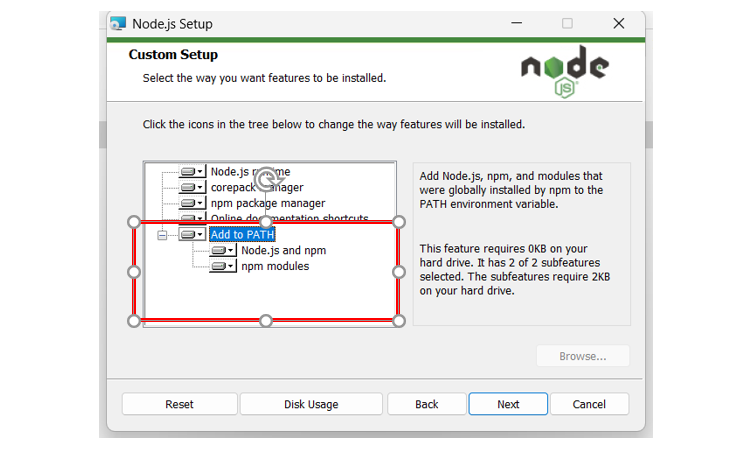
前往 Node.js 官方網站 下載安裝檔,安裝時請記得勾選 "Add to PATH" 選項。
3.下載Windsurf
前往 Windsurf 官方網站 下載安裝檔,安裝時請記得勾選 "Add to PATH" 選項。
4. 下載專案
使用 Git 將專案下載至本地端:
git clone https://github.com/macchen-yu/HSIPL_auto_fastmcp.git
下載完成後,切換至專案資料夾:
cd HSIPL_fastmcp
5. 安裝 server.py
在 全局環境(非虛擬環境)中先安裝 server 相關依賴:
uv run fastmcp install server.py
pip install fastmcp   #非常關鍵的步驟
pip install spectral
⚠️ 注意:必須在全局環境下執行!
6. 設定 mcpServers 配置
建立或修改設定檔(例如 openwebui 需要的 openwebui.json):
{
  "mcpServers": {
    "hsipl_autotool": {
      "command": "uv",
      "args": [
        "run",
        "fastmcp",
        "run",
        "c:/Users/User/Desktop/HSIPL_fastmcp/server.py"  // 這裡請改成你的實際路徑
      ]
    }
  }
}
7. 除錯開發 MCP Server
啟動 server 端服務器進行開發模式:
uv run fastmcp dev server.py
啟動成功後,會看到類似下方訊息:
Stdio transport: command=C:\\Users\\User\\.local\\bin\\uv.exe, args=run,--with,mcp,mcp,run,server.py
Spawned stdio transport
Connected MCP client to backing server transport
Created web app transport
Created web app transport
Set up MCP proxy
🔍 MCP Inspector is up and running at http://127.0.0.1:6274 🚀
你可以透過瀏覽器開啟 http://127.0.0.1:6274 來查看 MCP Inspector。
參考資料

Recommend MCP Servers 💡

mcp-server-simulator-ios-idb
A Model Context Protocol (MCP) server that enables LLMs to interact with iOS simulators through natural language commands.


browser-use-mcp-server
Browse the web, directly from Cursor etc.

Apt MCP Server
A TypeScript-based Model Context Protocol (MCP) server for controlling the apt package manager on Linux, enabling AI agents to install, remove, update, and query apt packages.


swift-mcp-gui
MCP server that can execute commands such as keyboard input and mouse movement on macOS


ios-simulator-mcp
MCP server for interacting with the iOS simulator

wayland-mcp
Provides screenshot, image analysis, mouse, and keyboard control tools for modern Linux desktops running Wayland.