

OpenStack MCP Server
Overview
An OpenStack resource query service based on MCP (Model Context Protocol), providing API interfaces to query compute, storage, network, image, and other resources from the OpenStack cloud platform.
Features
- Real-time Resource Queries: Get the latest resource status of OpenStack clusters via API
- Multi-dimensional Information: Support querying various resources including compute, storage, network, and images
- Flexible Filtering: Filter resources by name, ID, and other conditions
- Detail Level Control: Support basic, detailed, and full information display levels
- Standard MCP Interface: Fully compatible with MCP protocol, seamlessly integrating with large language models
Technical Architecture
- High-performance asynchronous HTTP service based on Starlette and Uvicorn
- Interact with OpenStack API using OpenStack SDK
- Provide structured OpenStack resource information to large language models through MCP protocol
- Support SSE streaming output for real-time feedback
Architecture Diagram
┌─────────────┐    ┌─────────────┐    ┌─────────────┐
│             │    │             │    │             │
│  AI Client  │───▶│  MCP Server │───▶│  OpenStack  │
│  (LLM)      │◀───│  (Server)   │◀───│  API        │
│             │    │             │    │             │
└─────────────┘    └─────────────┘    └─────────────┘
Installation
Requirements
- Python 3.10+
- OpenStack environment
Install via pip
pip install openstack-mcp-server
Usage
Start the Service
openstack-mcp-server --port 8000 --log-level INFO --auth-url 'http://<OpenStack-API-Endpoint>:5000/v3' --username '<OpenStack-Admin-User>' --password '<OpenStack-Admin-Password>'
After starting, the MCP interface will be available at http://localhost:8000/openstack.
Parameters
--port: Service listening port, default is 8000--log-level: Log level, options are DEBUG, INFO, WARNING, ERROR, CRITICAL, default is INFO--json-response: Use JSON response instead of SSE stream, default is False
Interface Example
Through the MCP protocol, you can use the following tools to query OpenStack resources:
Get OpenStack VM Instances
{
  "name": "get_instances",
  "arguments": {
    "filter": "web-server",
    "limit": 10,
    "detail_level": "detailed"
  }
}
Parameter description:
filter: Filter condition, such as instance name or ID (optional)limit: Maximum number of results to return (optional, default 100)detail_level: Level of detail in the returned information, options are basic, detailed, full (optional, default detailed)
Install from Source
# Clone repository
git clone https://github.com/wangshqly0407/openstack-mcp-server.git
cd openstack-mcp-server
# Create virtual environment
uv venv
# Activate virtual environment
source .venv/bin/activate
# Initialize runtime environment
uv sync
# Start streaming HTTP MCP server
uv run ./src/mcp_openstack_http/server.py --port 8000 --log-level INFO --auth-url 'http://<OpenStack-API-Endpoint>:5000/v3' --username '<OpenStack-Admin-User>' --password '<OpenStack-Admin-Password>'
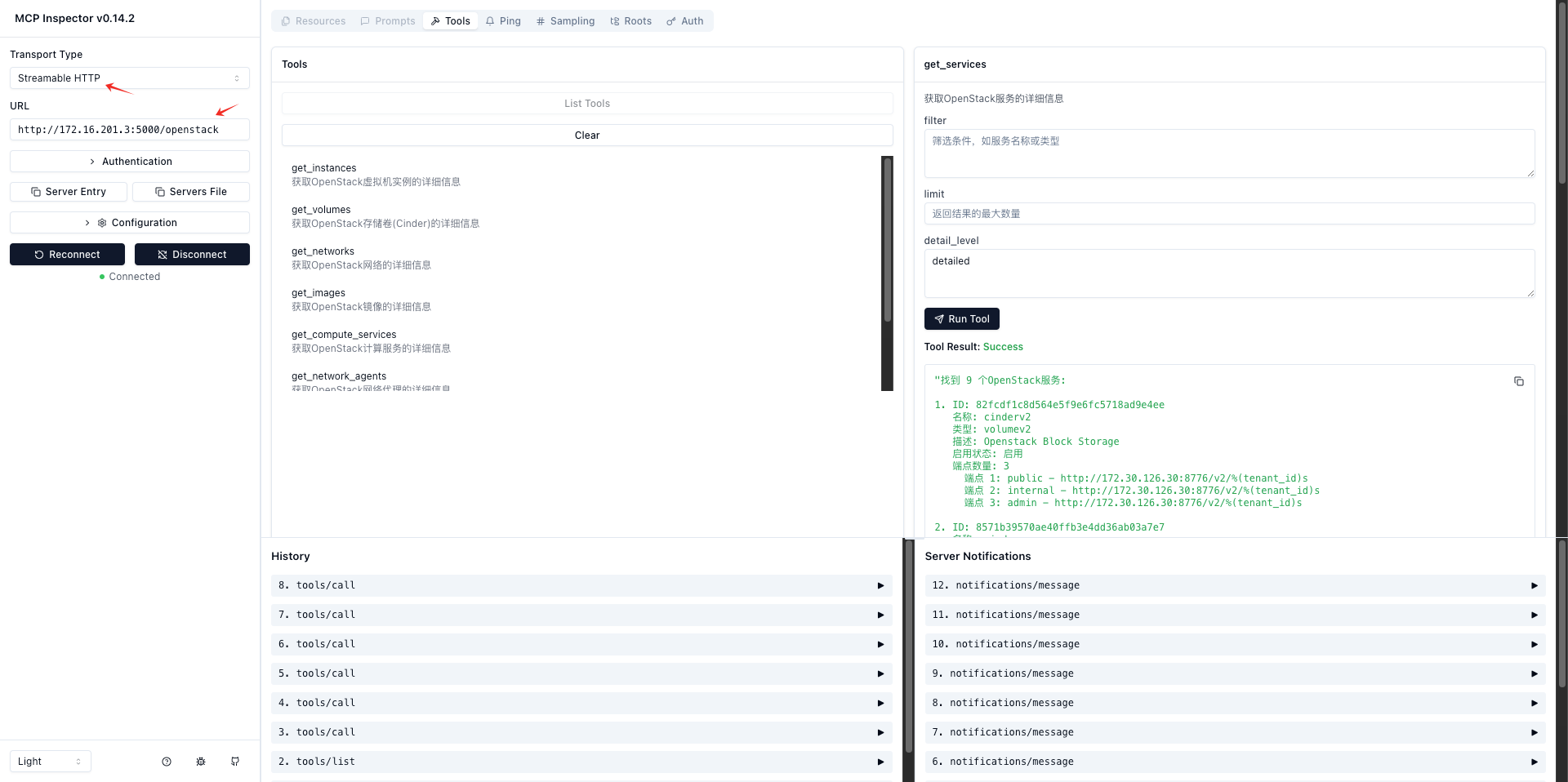
Testing and Verification
# Method 1: Test using npx
npx -y @modelcontextprotocol/inspector uv run ./src/mcp_openstack_http/server.py --port 8000 --log-level INFO --auth-url 'http://<OpenStack-API-Endpoint>:5000/v3' --username '<OpenStack-Admin-User>' --password '<OpenStack-Admin-Password>'

# Method 2: Test using docker
docker run -it --rm -p 6274:6274 -p 6277:6277 -v $(pwd):/app -w /app node:18 npx -y @modelcontextprotocol/inspector uv run ./src/mcp_openstack_http/server.py --port 8000 --log-level INFO --auth-url 'http://<OpenStack-API-Endpoint>:5000/v3' --username '<OpenStack-Admin-User>' --password '<OpenStack-Admin-Password>'
Access: http://localhost:6274/
Development Extensions
Adding New Resource Query Tools
- Add corresponding resource acquisition functions in
src/mcp_openstack_http/server.py - Register the new tool in the
list_toolsmethod - Implement the tool's processing logic in the
call_toolmethod
License
Apache 2.0
Recommend MCP Servers 💡

oss-mcp
一个基于Model Context Protocol (MCP)的服务器,用于将文件上传到阿里云对象存储服务(OSS),支持多配置和目录指定。


mcp-sharepoint-server
MCP Server for integration with Microsoft SharePoint, enabling document and folder management operations.


ms-fabric-mcp
Python-based MCP server for interacting with Microsoft Fabric APIs, with advanced PySpark notebook development, testing, and optimization capabilities with LLM integration.

mcp-server-hcp-terraform
MCP server integrating with HCP Terraform Cloud/Enterprise API to access module search and details

hyperbolic-gpu
Interact with Hyperbolic's GPU cloud, enabling agents and LLMs to view and rent available GPUs, SSH into them, and run GPU-powered workloads.

@kocierik/mcp-nomad
An MCP server written in Go that provides comprehensive management capabilities for HashiCorp Nomad, including job, deployment, namespace, node, allocation, variable, volume, ACL, Sentinel policy, and cluster management.
